
 Log In
LeadTruffle Insights
5 Ways to Improve Lead Volume in Google Local Services Ads
Get more from Google Local Services Ads with five practical steps, faster responses, and first-message examples backed by LeadTruffle research. Read the guide.
Quick Answer
tl;dr: To boost lead volume in Google Local Services Ads, check your profile and service targeting, set a realistic budget, manage incoming leads, and reply promptly. Then provide each message lead with a helpful initial response relating to the job. LeadTruffle’s research correlates that type of messaging with increased customer responses, and it is a way to get the most out of the leads that you are getting.
If your Google LSA account is idle, increasing your budget isn’t the only place to look. Check the services you are advertising, whether customers have confidence in your profile, and what happens when someone contacts you.
These five steps help attract new inquiries and keep them moving. The fifth is based on our own research into first responses, and features examples you can use in your business.
A note on the name: LSAs might still be referred to as “Google Guaranteed ads.” Google’s current advertiser badge is Google Verified. A change in the badge does not affect ad placements.
1. Improve Your Google LSA Profile and Service Targeting
Begin with what the homeowner sees and the searches your company can appear in.
Google’s explanation of LSA ad rankings mentions your reviews, your photos, your completed verification checks, and the relevance to the customer’s search. A full profile gives people more information when deciding who to contact.
Review these details:
- Job types: List the services your crews provide. Look for missing services that could bring suitable work.
- Service areas: Include areas you can reach and serve profitably.
- Hours: Keep them accurate, including when you can handle new inquiries.
- Photos: Present clear, up-to-date images of your team and work.
- Reviews: Ask for an honest review as a regular part of completing each job.
For instance, an HVAC firm that installs heat pumps should check whether its selected job types include that work. A missing service can leave a gap even when the business has capacity.
Don’t overextend coverage. When a plumber includes towns that are farther away, he or she may receive more calls, but the leads are not as valuable if it isn’t profitable to work on such small jobs. Monitor appropriate leads along with volume.
2. Give Your Google LSA Budget Room to Generate Leads
The number of leads you can get depends on your budget and bid settings. They should reflect local costs and your capacity to take on work.
Right now, Google advises Maximize Leads bidding, and a budget sufficient for at least 10 leads weekly. It also says the bidding model needs approximately two weeks to adjust before results become accurate. Use this as a starting point to compare with your figures.
Before increasing spend, check:
- Are you spending the allocated budget or spending far less than that?
- How much does a charged lead cost in your account?
- How many leads become booked jobs?
- Can your team answer and serve the extra inquiries?
Planning example, not a market benchmark: With a $600 weekly budget at an average of $60 per charged lead, you can plan for approximately 10 leads. If three become jobs, the advertising cost is $200 per booked job. Whether that works depends on the value and margin of those jobs.
Use your own recent costs in the Google LSA cost calculator. If you’re already using all the available budget and the jobs are profitable, then maybe a slight increase would be appropriate. If the spend is low, look into your profile, targeting, and response coverage before going so far as to blame the budget.
3. Deal With All Leads and Follow Up
When you check your inbox regularly, you can find inquiries that still need a response. Someone who asked for a quote yesterday might still be waiting for a helpful reply today.
Assign an owner and next step to each open lead. Track whether the customer needs a quote, has booked, selected a different company, or isn’t responding. Record bookings as they occur.
Monitor five weekly numbers:
- New inquiries received.
- Inquiries your team answered.
- Customers who continued the conversation.
- Jobs booked.
- Advertising cost per booked job.
These numbers help you find where the problem is. Few inquiries suggest a visibility, demand, or account-settings issue. Lots of inquiries with few answers suggest a coverage issue. When you answer plenty of messages but few customers reply, it’s time to take a closer look at what you’re sending.
Accurate status tracking helps you make those decisions. Google’s stated guidance on their rankings does not specify that if you mark a lead as booked, you will get more leads. Use the dashboard to manage work and measure results.
For a repeatable process, see our guide to connecting Google LSA to your CRM.
Give Accurate Feedback on Poor-Fit Leads
Google now uses automated lead credits for eligible accounts and asks for feedback through its lead survey. Review charges and give accurate feedback when a lead is a poor fit.
Google doesn’t support credits just because a lead requests a job type or geographic area you don’t serve. Pay close attention to those settings. Narrowing them can reduce total volume while making the inquiries you receive more relevant.
4. Quickly Answer Google LSA Calls and Messages
Response speed should be included as its own category in your LSA plan.
Google says consistently fast responses could help ad rankings. Its ranking guidance also identifies missed calls as a potential negative signal. Google can show the average time it takes you to respond to a message in the ad for message leads.
Establish a response process at the times leads do arrive:
- Have a person answering phones while crews are working.
- Provide a clear process for calling back missed calls.
- Enable message leads where available and have someone or an automatic responder monitor them.
- If you take inquiries outside business hours, cover nights and weekends.
- Review leads each day so a notification failure does not leave someone waiting.
A practical internal objective is to respond to message leads as they come in. It’s an operating goal and not a Google rule that will guarantee a specific ranking gain within a certain number of seconds.
To help, LeadTruffle’s Google LSA responder automatically responds to LSA incoming messages, even when you’re not in the office. Once the email responder is set up, it can trigger an AI conversation via Google’s messaging relay when an LSA notification is forwarded. Your team can review the conversation and take over when necessary.
This removes the wait for someone in the office to see an email. There is still a need to have a coverage plan for call answering.
Our speed-to-lead guide explains how to respond quickly across a variety of lead sources.
5. Reference the Actual Job in Your First Message
When you are able to respond in a timely fashion, focus on the response. When the customer describes the situation, it gives you a good place to start: the broken appliance, leaking pipe, or project that they are interested in having quoted.
We analyzed 4,699 actual conversations on Yelp, Thumbtack and Google Local Services Ads in our first-reply benchmark research. The observed reply rate within 24 hours for messages with three features was 60.5%, compared with 50.3% for other messages:
- A reference to the customer’s specific job.
- One focused question.
- No immediate request for a phone number or other contact information.
This is a 10.2 percentage-point difference in the combined sample, not an LSA-only result. It’s an observational study of associations with customer responses, not proof of more bookings, revenue, or incoming Google leads. Per-channel estimates have wide confidence intervals.
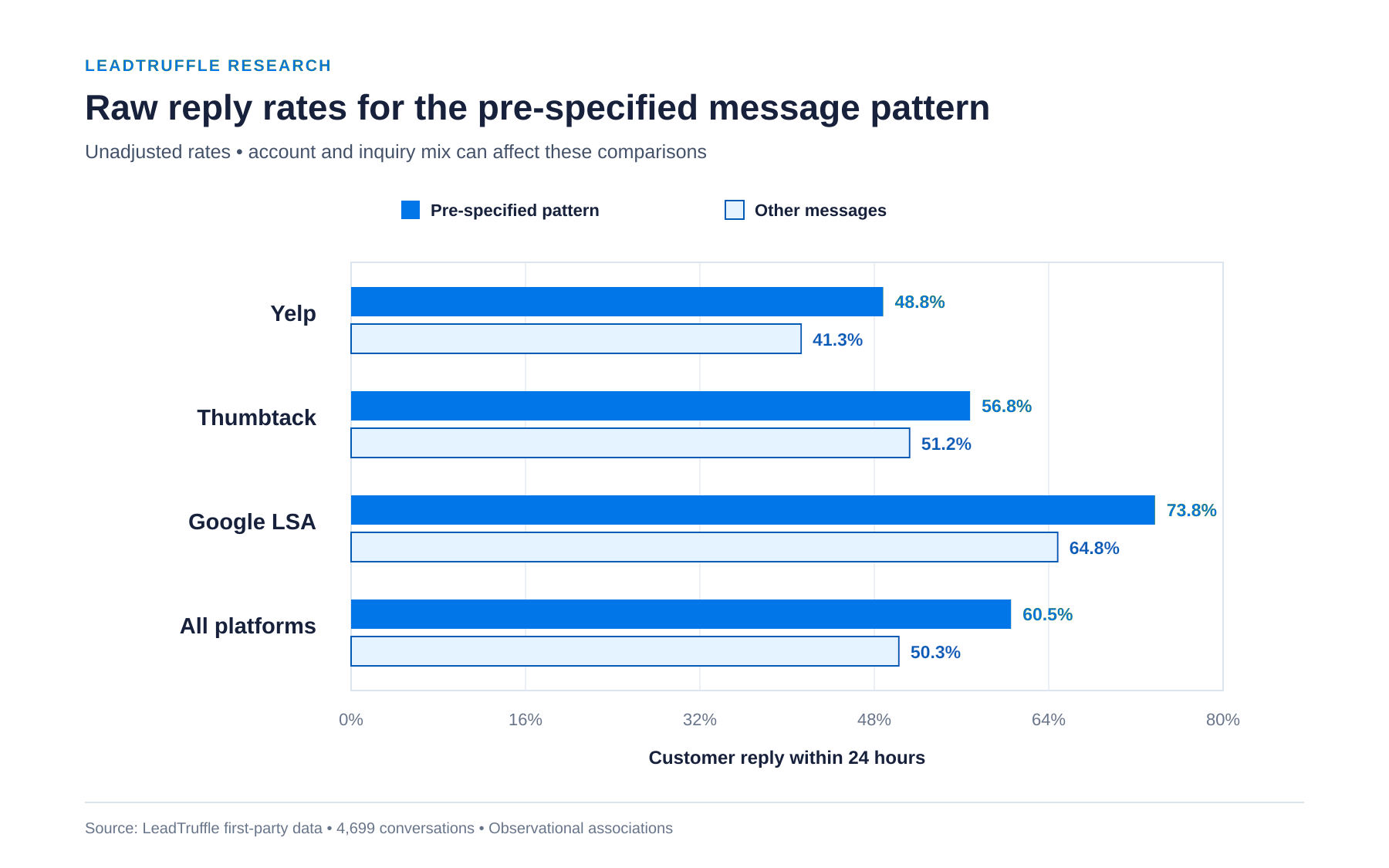
Source: LeadTruffle’s first-reply benchmark. The chart compares customer reply rates, not advertising lead volume.
What Should Your First LSA Message Say?
Use a detail the customer has already given, then ask the next useful question. Don’t make them repeat the problem or supply a list of contact details before you address it.
The following examples illustrate the approach for this guide. They are not customer transcripts or individually tested scripts.
Plumbing concern: “Water heater dripping from the bottom.”
“Thanks for the information on the water heater leak. Is water pooling under the tank or is it dripping from a pipe connection?”
HVAC problem: “Upstairs AC is on, but not cooling.”
“I noticed your upstairs air conditioner is running without cooling. Are the vents blowing warm air, or is there little airflow?”
Roofing inquiry: “We have a ceiling stain after yesterday’s rain.”
“Thank you for explaining the ceiling stain after the rain. Is it located close to a skylight, chimney or other roof section?”
Every response demonstrates that you have read the inquiry and gives the homeowner one thing to answer. If they’ve already provided that information, ask about the next detail your team needs. Adapt the response to urgency and safety; these are ordinary intake examples, not emergency guidance.
This is in contrast to something like “Thank you for your inquiry. Please provide your name, phone number, address, and availability.” It requires the customer to take a few steps before it can handle the job.
What Did We Notice Specifically on Google LSA?
The research page includes a separate Google LSA analysis of messages that acknowledged the specific request and then asked a question. This finding is exploratory and needs further testing. It supports trying a more relevant opening without assuming the size of the effect is guaranteed.
You can read the one-page research summary or the full white paper and methodology.
As the LSA inquiry comes in, LeadTruffle can take the information provided in the inquiry and use it to write a relevant opening and further qualify the inquiry. Your response setup should give it accurate information about your services and the questions your team needs answered.
Where to Start This Week
Look through the past 20 LSA inquiries. Track missed calls, unanswered messages and conversations that ended after your initial response. Then compare your service options and costs to the jobs you really need.
First select the clearest gap. If messages go unanswered overnight, improve response coverage. If they’re getting a response but still not responding, consider the wording of the initial message. If suitable inquiries are scarce despite good response coverage, review profile quality, targeting, and budget.
See how LeadTruffle handles Google LSA messages and helps you respond quickly with the right information in your daily lead process.
Frequently Asked Questions
Does Replying Faster Help Google LSA Rankings?
Google includes responsiveness in its ranking factors and says fast responses could help rankings. Speed is one factor among several and does not guarantee a specific position or number of leads.
Is It Worth Spending More on LSA?
Think about it when the budget is already being used, the jobs are making money, and your team is able to work more. If spending is less than budgeted, review other limits first. Don’t expect to get a linear increase in leads if you increase your budget.
Does Marking Leads Booked Change Lead Volume?
Maintain up-to-date booking statuses to measure results and follow up accordingly. Google’s published ranking guidance doesn’t establish an automatic lead-volume reward for marking leads booked.
What’s a Good First Reply to a Google LSA Message?
Refer to the specific job the customer described and ask one useful question based on what they’ve already told you. Our research revealed a relationship between that pattern (no immediate contact-detail request) and increased customer responses for the channels studied.