



 Log In
No coding required
 ChatGPT
  Claude
 Connect LeadTruffle to ChatGPT or Claude
Ask about your LeadTruffle conversations, calls, and bookings in the AI app you already use. Add our connector, or paste one message to run a full call review.
Quick Answer
tl;dr: To ask questions in a regular chat, add the LeadTruffle MCP
connector at https://pub-api.leadtruffle.com/mcp and approve access. For a full call review,
in the ChatGPT desktop app, choose Work
and On your computer. In the Claude desktop app, choose
Code and Local. Select an empty folder, copy a
LeadTruffle API key, then paste the read-only prompt below. The Inbox API provides stored messages, calls, and booking activity for your report.
MCP connector
Add LeadTruffle as a connector
Ask about your contacts, conversations, calls, bookings, and reports in a regular chat. A LeadTruffle admin signs in and approves access.
ChatGPT or Claude
- Add a custom connector in your app's settings.
- Enter
https://pub-api.leadtruffle.com/mcpand choose OAuth sign-in. - Sign in to LeadTruffle as a business admin.
- Check the business name, then click Allow read access.
- Turn on the connector in your chat and ask, “Which contacts need a human?”
Custom connectors depend on your plan and workspace settings.
Claude Code and other MCP clients
- Create a dedicated key in API Keys with only the read permissions you need.
- Connect over Streamable HTTP with the key in one header.
claude mcp add --transport http leadtruffle https://pub-api.leadtruffle.com/mcp \
  --header "Authorization: Bearer YOUR_LEADTRUFFLE_API_KEY"
Revoke ChatGPT or Claude access anytime under Settings → API keys → Manage MCP connections. Read the MCP guide for tools, permissions, and other clients.
Full call review · Step 1
Connect LeadTruffle with ChatGPT Work or Claude Code
For a saved 30-day report, use a mode that can run code. Regular chat mode cannot run the API request for you.
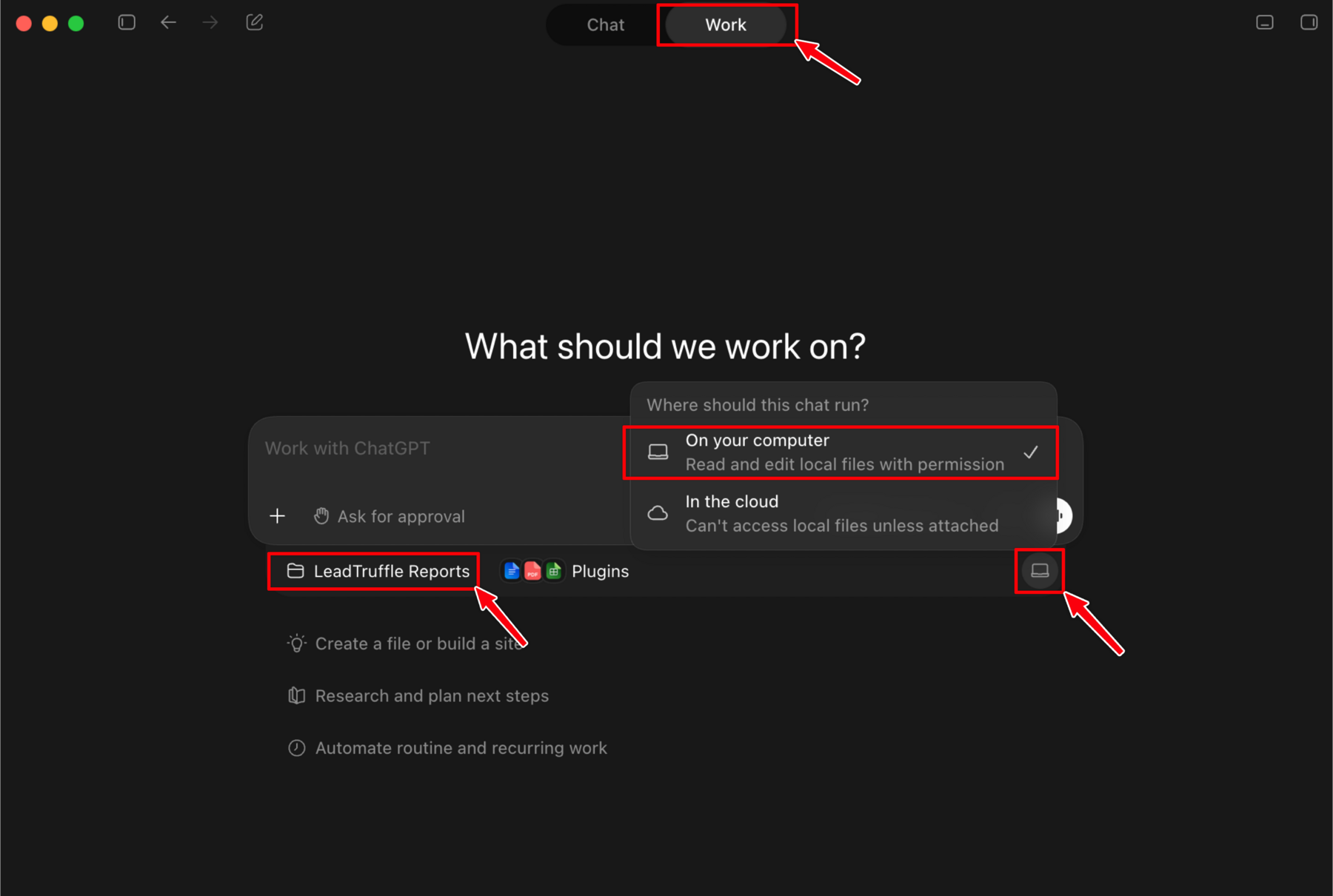
Set up ChatGPT
Download the ChatGPT desktop app if you do not have it yet.
- Open ChatGPT on your computer.
- Click Work at the top.
- Choose On your computer.
-
Make a new folder named
LeadTruffle Reports, then choose that folder.
Do not use regular Chat mode.
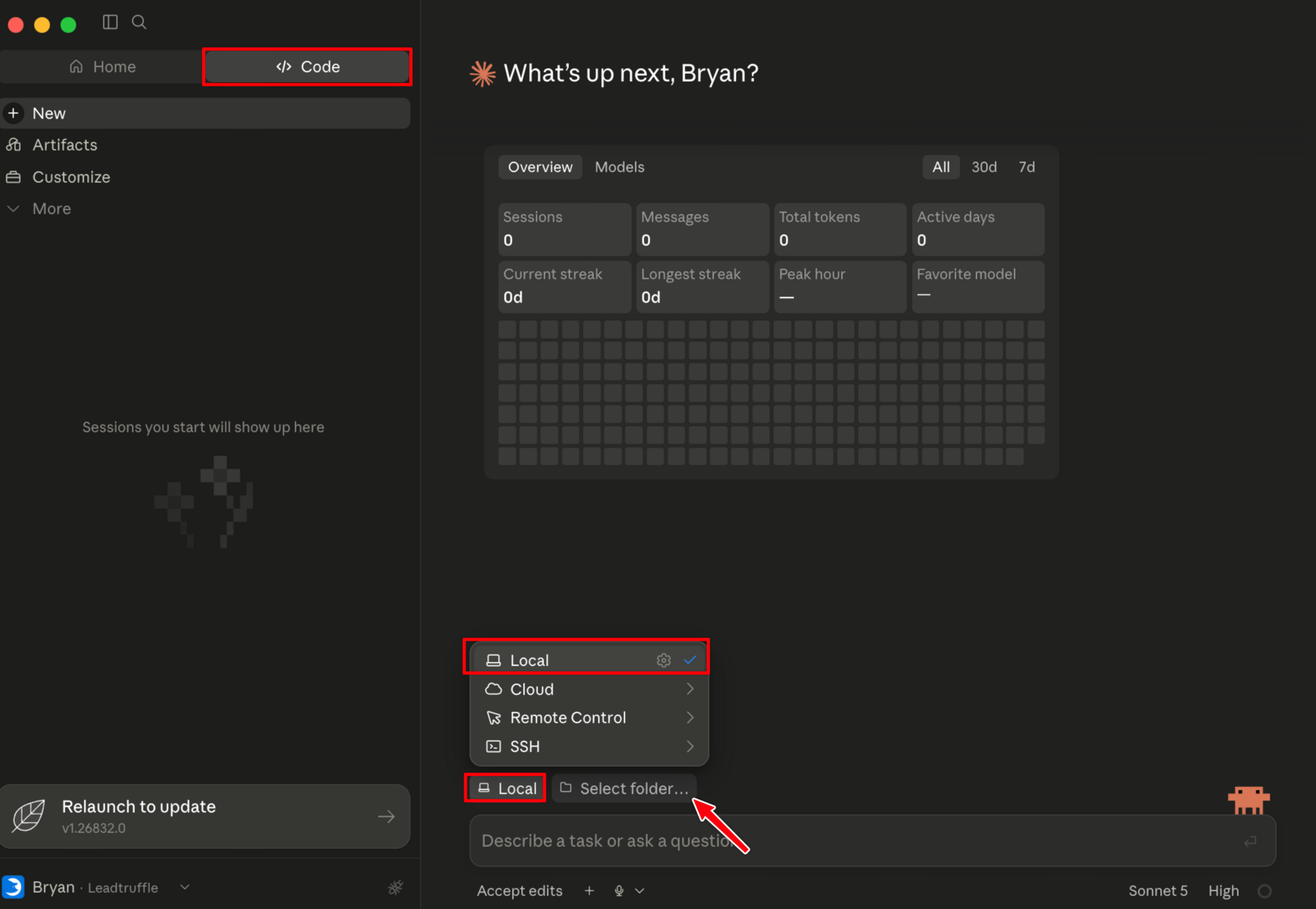
Set up Claude
Download the Claude desktop app if you do not have it yet.
- Open Claude on your computer.
- Click Code at the top.
- Choose Local, then click Select folder.
-
Make a new folder named
LeadTruffle Reports, then choose that folder.
Do not use regular Chat mode.
Step 2
Copy your LeadTruffle API key
The key gives the private work session access to your LeadTruffle account.
- Open API Keys in your LeadTruffle dashboard.
- Click the button to make a new API key.
- Name it
AI Call Review. - Copy the long line of letters and numbers.
Treat your API key like a password. Only paste it into a private session, and revoke it when you no longer need it.
Step 3
Paste this message
Copy the whole message. Replace PASTE YOUR KEY HERE with the API
key you just copied, then paste it into ChatGPT Work or Claude Code.
GET requests. Your key may also permit
changes, so keep this session focused on reporting.
Review API permissions.
I want you to review my LeadTruffle conversations and calls from the last 30 days.

My LeadTruffle API key is:
PASTE YOUR KEY HERE

Read the full API instructions first:
https://api-docs.leadtruffle.com/llms-full.txt

Use my key in the X-API-Key header. Keep it private and out of reports.

Start with the contact inbox, including archived contacts:
GET https://pub-api.leadtruffle.com/api/v2/pub/inbox?view=all

Please do the work for me. Write and run any scripts you need. Do not give me coding instructions.

Use GET requests only. Do not send messages or change anything in LeadTruffle.

Follow pagination for contacts and each relevant message, call, transcript, and booking resource. Use the documented date filters for the last 30 days. Include activity on older contacts, not just newly created leads. Respect rate limits.

Review saved messages, call summaries, full transcripts where available, recorded bookings, and open booking-change requests. Use the documented lead-inquiry endpoints if you need qualification details. Treat contact IDs and lead inquiry IDs as different identifiers.

Make a simple report that tells me:
1. How many contacts, messages, and calls you reviewed, with the exact date range and any coverage gaps.
2. Which people appear ready to book, based on their messages.
3. Which calls went well, and which went badly and why.
4. Which promising contacts have no confirmed booking in the available records.
5. Who needs follow-up first, including open human handoffs or booking-change requests.
6. The five biggest things we should improve.

Do not treat an external booking's last observed state as a live CRM confirmation. Report missing transcripts or unknown booking status clearly. Separate your assessment from recorded facts.

Use plain English and short examples. Save the report in the LeadTruffle Reports folder and show me a short summary here.

Start now.
Step 4
Approve the request and let it work
ChatGPT or Claude may ask before it runs a script or connects to LeadTruffle. Click Allow, Approve, or Run.
Wait for the report
Reading every lead and call can take several minutes. The agent will save the
full report in your LeadTruffle Reports folder and show a short
summary in the app.
Ask follow-up questions
- Which employee needs the most coaching?
- Show me the 10 best leads that did not book.
- Which lead source gave us the worst calls?
- What mistakes are costing us the most money?
Troubleshooting
If the call review does not work
It gives me coding instructions
You opened the wrong mode. In ChatGPT, choose Work and On your computer. In Claude, choose Code and Local. Then paste the message again.
It only reviews the first page
Tell it: “Follow the remaining pages for contacts, messages, calls, and transcripts. Include activity from the last 30 days on older contacts. State any coverage gaps.”
It says the API key is wrong
Go back to LeadTruffle API Keys, make a new key, replace the old key in the prompt, and try again.
FAQ
Connecting LeadTruffle to ChatGPT and Claude
Can ChatGPT or Claude connect to LeadTruffle automatically?
Yes. Add the LeadTruffle MCP connector as a custom connector, sign in to LeadTruffle as a business admin, and approve access. For a full 30-day call review report, use ChatGPT Work or Claude Code with an API key instead.
What can the LeadTruffle MCP connector do?
It reads contacts, stored conversations, calls and transcripts, calendars and booking history, integration logs, and analytics, revenue, website, Google LSA, and usage reports. A business admin approves access when connecting.
Which LeadTruffle endpoint should my AI agent use?
Start with the V2 Inbox API to find contacts, then read their messages, calls, and recorded bookings. Give your agent the complete llms-full.txt documentation and ask it to follow pagination for each resource.
Can an AI agent analyze LeadTruffle call transcripts?
Yes. The Calls API provides saved call summaries and paginated transcripts where available. Recordings use a separate endpoint and media permission, with short-lived download links. Missing transcripts should be reported as missing, not inferred.
How should I protect my LeadTruffle API key?
Only paste the key into a trusted, private session. Do not post it in a public or shared chat. Use GET requests only for reports, and revoke keys you no longer need.
Why did ChatGPT or Claude review only part of my account?
Contacts, messages, call transcripts, and bookings can each span multiple pages. Ask the agent to follow every relevant cursor and state any missing data or incomplete coverage in its report.
Still stuck?
Email us and say which step stopped you. We can help you connect your private AI work session to LeadTruffle.