



 Log In
Google LSA Autoresponder
The LSA Responder That Does More Than Just Reply
LeadTruffle auto-responds to Google LSA leads in seconds, routes them into SMS or voice follow-up, and syncs every LSA lead to your CRM so you win the job, not just the first reply.
- Instant LSA respond - replies within seconds of every new LSA lead
- Protects your LSA response time score for better Google rankings
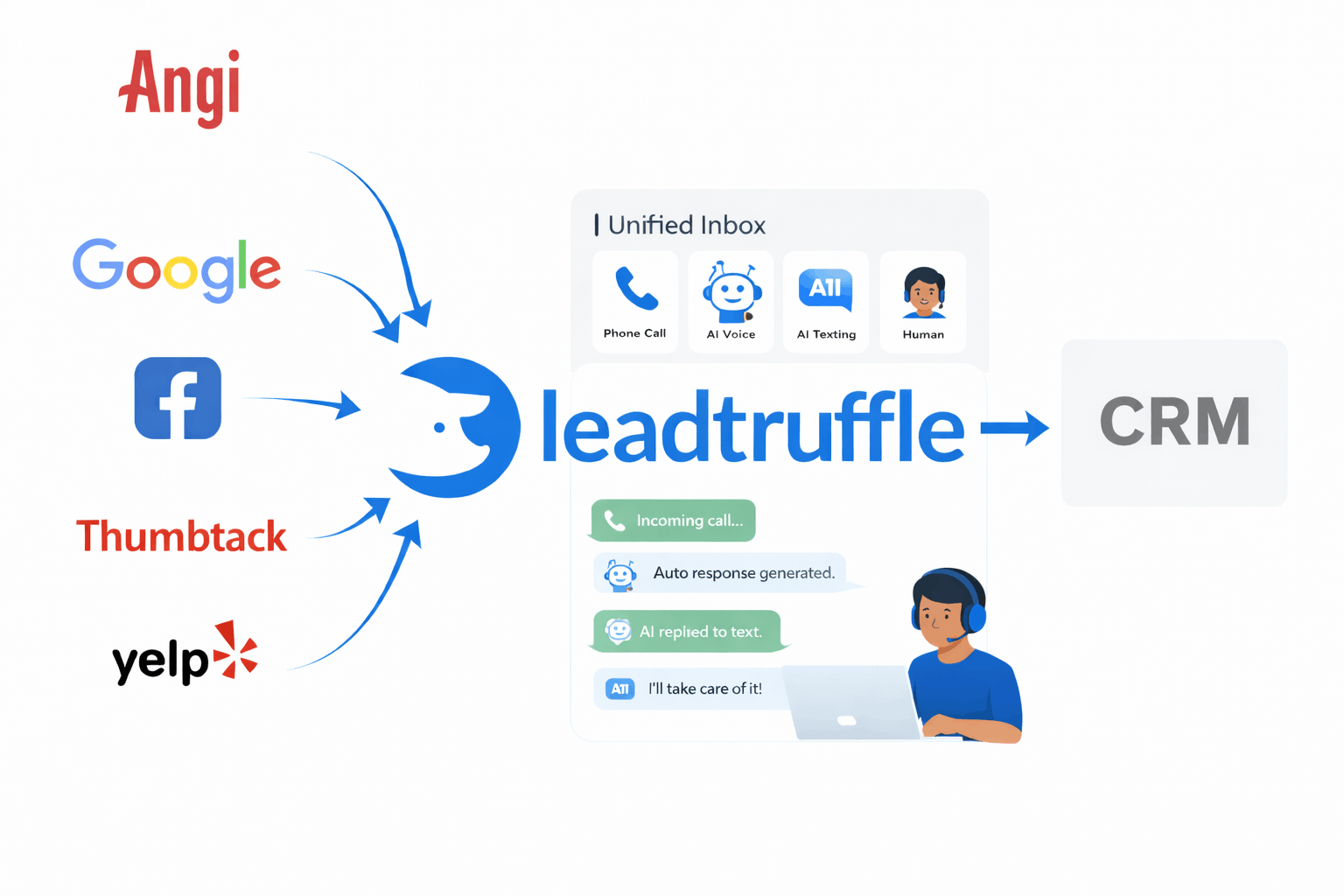
- LSA leads enter the same inbox as Angi, Thumbtack, Yelp, and website - one place to manage all
- Scheduled follow-ups keep LSA leads warm
- Human takeover: pause AI and respond manually to any LSA lead any time
- CRM sync: push qualified LSA leads to Jobber, HCP, ServiceTitan, HubSpot, Workiz
See how LeadTruffle responds to paid leads, qualifies them, and routes every conversation into one inbox.
Quick Answer
tl;dr: LeadTruffle auto-replies to Google LSA leads with direct Google Ads syncing or the supported email relay, keeps every conversation in one inbox, and pushes qualified leads to your CRM. You can take over replies any time, and scheduled follow-ups help protect your response-time score and win more jobs.
Call Connect · Automatic calls for new leads
Have eligible Google LSA message inquiries ring your team
Call Connect supports new Google LSA message inquiries received through email forwarding with a callable customer number. Enable the source and choose active hours. Your employee hears the details and presses 1 before the customer is dialed. API-imported leads and inbound LSA calls do not trigger Call Connect. Regular voice credits apply.
See how Call Connect worksHow the Google LSA autoresponder works
1. Connect LSA
Connect Google Ads for direct LSA syncing. Email forwarding is also supported.
2. Auto-reply instantly
AI responds in seconds and keeps the thread in your unified inbox.
3. Sync to CRM
Qualified leads are pushed to your CRM with full conversation history.
Why LSA Response Time Determines Who Gets the Job
Google ranks businesses with faster response times higher in LSA results. A slow LSA response - even 15 minutes - drops your position, increases your cost per lead, and lets a competitor book the job you paid for.
- Google's algorithm rewards consistent, fast LSA response with higher ad placement
- Homeowners message 2–3 contractors at once - the first to respond books the job
- Every LSA lead costs $20–80. A slow response turns that spend into waste.
- LeadTruffle's LSA responder replies within seconds, 24/7 including after hours
Unified inbox + workflow board
LSA conversations sit next to website, calls, Angi, Thumbtack, and Yelp. Assign, reply, and move every lead through your workflow stages.
CRM push with full context
Sync to Jobber, Housecall Pro, HubSpot, Workiz, and more. Every lead arrives with notes, qualification details, and a link to the conversation.
Human takeover and compliant follow-up
Pause AI on any conversation and reply manually. LeadTruffle uses LSA approved email relay or API workflows so replies stay compliant.
Google LSA Autoresponder FAQ
Quick answers to common questions about LSA follow-up.
What is an LSA responder?
An LSA responder is a tool that automatically replies to Google Local Services Ads leads as soon as they arrive, protecting your response time score and making sure no LSA lead goes unanswered. LeadTruffle goes further - it routes the lead into SMS, voice, and CRM workflows so the response is the start of a full conversion process, not a one-off reply.
How fast should I respond to Google LSA leads?
Google tracks LSA response time and uses it as a ranking factor. Most experts recommend responding within 60 seconds. Contractors who respond in under 5 minutes are significantly more likely to book the job than those who respond in 30+ minutes. LeadTruffle's LSA responder automatically replies within seconds of every new lead.
Does a faster LSA response time improve my Google ranking?
Yes. Google rewards businesses with consistent, fast LSA response with better placement in Local Services Ads results. Faster response also leads to more booked leads before competitors engage.
How fast does the LSA autoresponder reply?
Typically within seconds of the lead arriving, which helps protect your LSA response time score.
What is the difference between an LSA autoresponder and an LSA responder?
They refer to the same thing. An LSA responder or LSA autoresponder is software that automatically replies to Google Local Services Ads messages on your behalf. LeadTruffle is an LSA responder that also handles SMS follow-up, voice, and CRM sync - not just the initial auto-reply.
How does LeadTruffle connect to Google LSA?
You can forward Google LSA lead notification emails to LeadTruffle, or connect Google Ads for direct API sync.
Does the autoresponder reply to LSA leads automatically?
Yes. LeadTruffle replies instantly through the LSA email relay or API workflow and keeps the full thread in your unified inbox.
What lead details are captured from Google LSA?
LeadTruffle stores the lead request details, contact info, conversation history, and qualification notes for each LSA lead.
Can LeadTruffle help handle my LSA phone calls?
Yes. LeadTruffle's AI can pick up LSA phone calls your team misses, qualify the caller over voice, and book the job into your CRM when booking is configured.
Do you support automated follow-ups?
Yes. You can schedule follow-ups to keep LSA leads warm if they do not respond right away.
Can I respond manually to LSA leads?
Yes. You can take over any conversation in the LeadTruffle app and reply manually at any time.
How does LeadTruffle compare to LSArespond?
LSArespond is a standalone LSA responder focused on the initial auto-reply. LeadTruffle includes LSA auto-response as part of a broader lead workflow: unified inbox, AI SMS/voice follow-up, human takeover, and CRM sync to Jobber, HCP, ServiceTitan, HubSpot, and Workiz. Ideal for teams that want the response to be the start of a sales process.
Protect your LSA ranking with faster replies
Talk to us and see how Google LSA leads convert with instant follow-up.