


 Log In
 Built for Thumbtack leads
Thumbtack Auto Responder for Home Service Businesses
Respond to new Thumbtack leads through a direct API connection. Send one automatic first reply or let AI continue the conversation, qualify the job, and offer booking through your configured scheduling workflow.
- Direct Thumbtack API connection. No Zapier setup required.
- AI replies inside the customer’s Thumbtack message thread.
- Choose one automatic first reply or ongoing AI conversations.
- Pause AI and let your team take over when needed.
Your leads. Your booking rules. Your team in control.
Thumbtack in LeadTruffleOne connected inbox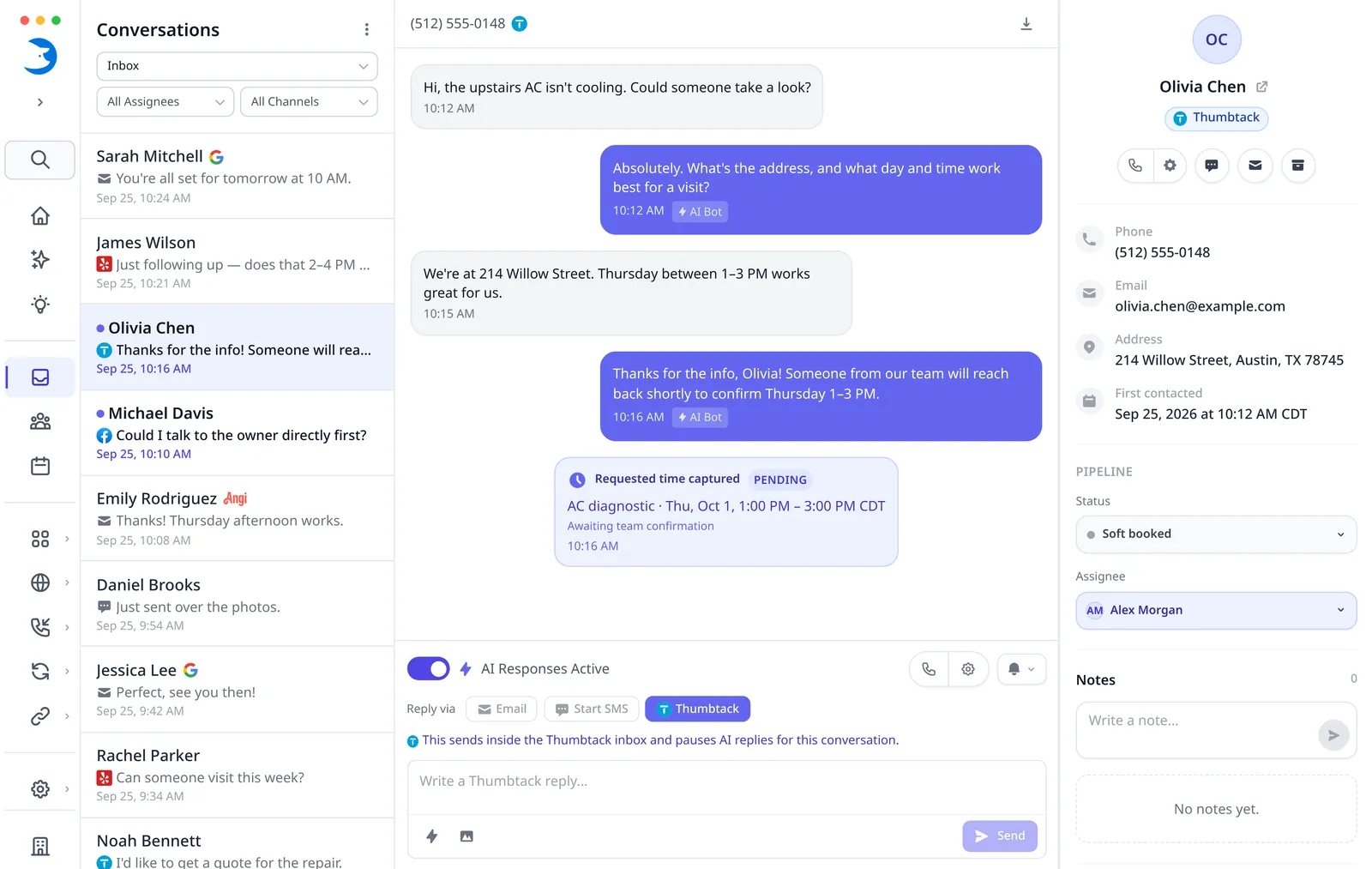
Quick Answer
tl;dr: LeadTruffle connects directly to Thumbtack and replies in the existing message thread. Choose a single automatic first response or an ongoing AI conversation. Booking depends on your connected scheduler and account configuration, and your team can take over when needed.
Call Connect · Automatic calls for new leads
Have new Thumbtack leads ring your team
Call Connect can ring your chosen team number for supported new Thumbtack message inquiries with a callable phone. Enable the source and choose active hours; your employee hears the details and presses 1 before the customer is dialed. Incoming-call and consultation lead types are excluded. Regular voice credits apply.
See how Call Connect worksHow it works
From a new lead to a connected workflow.
Connect Thumbtack, respond with context, and keep your CRM informed.
Connect Thumbtack
Authorize your Thumbtack account to bring new lead inquiries and messages into LeadTruffle. Choose which connected businesses you want to enable.
Explore Thumbtack setup and integration controlsAuto-reply
Respond inside Thumbtack. Choose one automatic first reply or continued AI handling, with qualification and booking when configured. Your team can take over when needed.
Sync to your CRM
Send supported lead and contact details, qualification notes, and conversation context to your connected CRM. Available records and fields depend on the integration.
Check CRM sync and booking supportThe Thumbtack walkthrough
See It in Action
See how LeadTruffle handles Thumbtack lead conversations.
Automation that fits your team
A first reply.
Or the conversation.
Choose how much of the conversation AI handles. Your team can step in whenever a lead needs a person.
First reply only
Send one automatic opening response, then let your team handle the next steps.
Ongoing AI conversations AI handling
Let AI continue replying, collect job details, and offer booking through your supported scheduling setup.
One inbox + workflow board
Keep Thumbtack beside website, phone, Yelp, Angi, and Google LSA lead inquiries. Assign conversations, reply, and move contacts through your custom Lead Workflows stages from new to won.
Explore the unified inboxFollow up with quiet leads
Use configured follow-ups to continue Thumbtack conversations when customers stop replying. Follow-up timing and handling follow your account settings.
Explore automated follow-upHuman takeover
Pause AI on a conversation and respond manually with the customer’s details and history available. Your replies sync back to the Thumbtack thread.
Your CRM. Your scheduling setup.
Connect the details.
Support the booking.
CRM sync sends supported lead and contact details to your team’s tools, including sync-only CRMs such as HubSpot. AI booking creates an appointment or job through a supported, configured scheduling workflow.
They are different capabilities. We’ll help you check which setup fits your business.
Explore CRM sync and booking supportSupported CRM booking options include
Account setup, availability, and booking rules must be configured. Supported sync records and fields vary by integration.
AI can book in LeadTruffle’s built-in scheduler with Google Calendar busy-time sync. Your CRM can receive supported lead details separately.
Common questions
Thumbtack Auto Responder FAQ
What to know before connecting your Thumbtack leads.
Do I need Zapier to connect Thumbtack?
No. LeadTruffle connects directly to Thumbtack through its API. Authorize your Thumbtack account in LeadTruffle; no Zapier setup is required.
Does AI reply inside Thumbtack?
Yes. AI replies in the customer’s existing Thumbtack message thread. Your team can also send replies back to Thumbtack from LeadTruffle.
Can I send just one automatic reply?
Yes. Choose first-reply-only mode to send one automatic opening response, then let your team handle the next steps. You can also enable ongoing AI conversations.
Can my team take over?
Yes. Pause AI on a conversation and reply manually from LeadTruffle, with the customer’s details and conversation history available. Manual replies sync back to Thumbtack.
Can AI book appointments from Thumbtack conversations?
Yes, when AI booking is enabled and configured. AI can book in LeadTruffle’s built-in scheduler with Google Calendar busy-time sync, or through a supported CRM such as Jobber, Housecall Pro, ServiceTitan, or Workiz. A CRM sync connection alone does not enable appointment booking. Account setup, availability, booking rules, and supported records vary by integration.
What lead details are available?
LeadTruffle brings in the customer request, job details, contact information provided by Thumbtack, and conversation history, including shared images when available. AI can collect additional job and contact details during the conversation. Supported CRM sync fields vary by integration.
Can I automate follow-ups?
Yes. Configure scheduled follow-ups for Thumbtack leads who stop replying. Follow-ups depend on your account settings, and human takeover stops automated replies. SMS follow-up is a separate option that requires an eligible number, consent, and the supported texting setup.
How quickly does the autoresponder reply?
LeadTruffle triggers an automatic reply when a new Thumbtack lead inquiry arrives. Actual timing depends on your account settings and Thumbtack’s message delivery.
Can I connect multiple Thumbtack businesses?
Yes. Connect multiple Thumbtack businesses under one LeadTruffle account and choose which businesses are enabled for automation. You can also import older conversations for context.
Make more of your Thumbtack leads.
Book a demo to see how LeadTruffle can handle your Thumbtack leads. We’ll walk through replies, follow-ups, and booking options for your CRM and scheduling setup.