
 Log In
LeadTruffle Insights
LeadTruffle + Leap CRM Integration: AI Lead Sync, Booking, and Revenue Tracking
Connect LeadTruffle with Leap CRM to sync qualified leads, let AI book appointments, and track which marketing sources turn into real revenue.
Quick Answer
tl;dr: The LeadTruffle + Leap CRM integration helps home service contractors sync qualified leads into Leap CRM, let AI book appointments based on your rules, check existing Leap CRM appointments before booking, and match invoices back to the original LeadTruffle lead. It is built for contractors who want faster lead response, fewer missed opportunities, cleaner CRM records, and better visibility into which marketing sources turn into real revenue.
The integration can help your team:
- Send qualified leads into Leap CRM as customers
- Let AI book appointments into Leap CRM
- Offer appointment times based on your booking rules
- Check existing Leap CRM appointments before booking
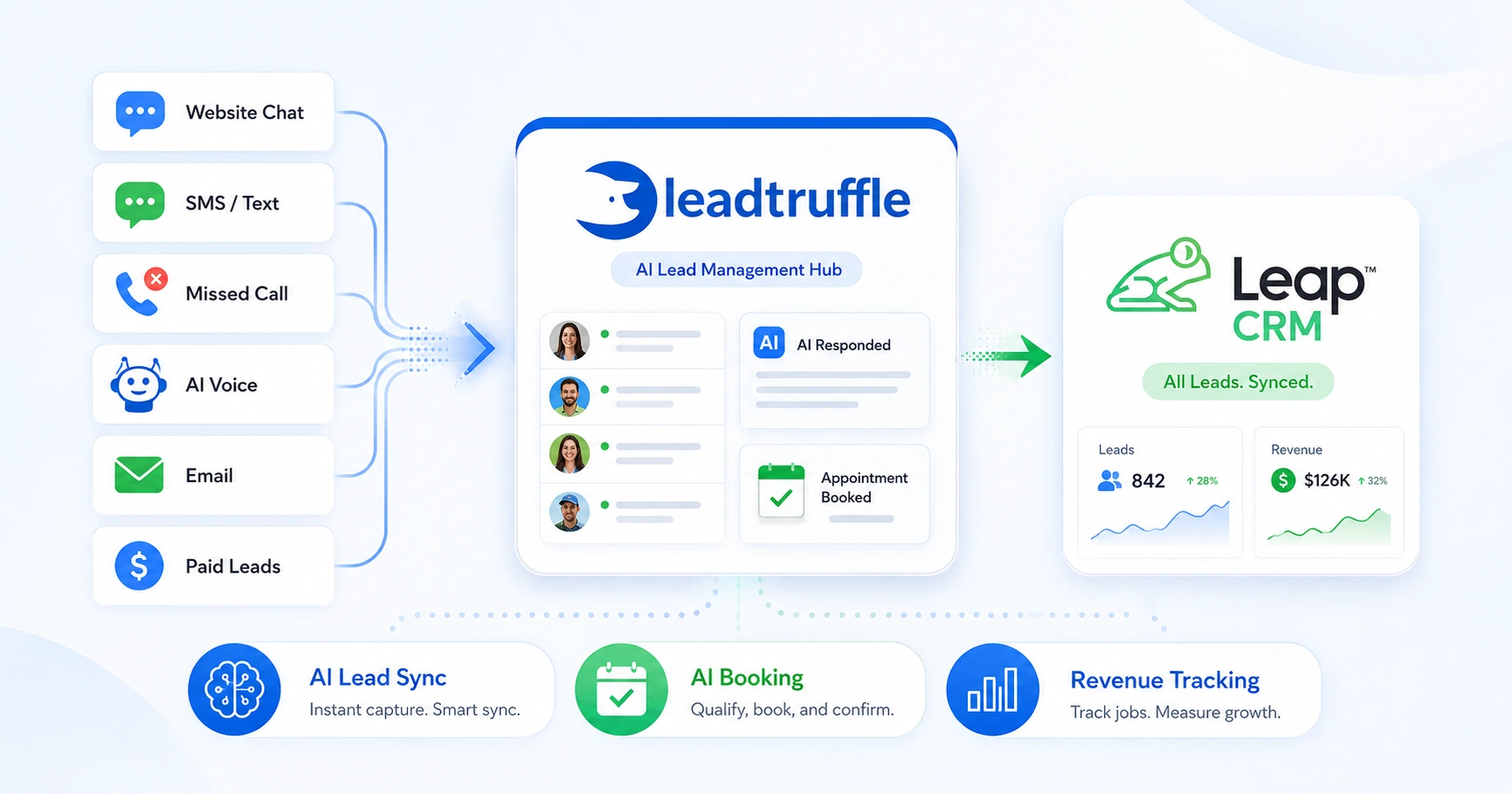
- Capture leads from website chat, SMS, missed calls, AI voice, forms, email, and paid lead sources
- Match Leap CRM invoices back to the original LeadTruffle lead
- Track which lead sources are bringing in real revenue
LeadTruffle now connects with Leap CRM, giving home service contractors an easier way to manage new leads, book appointments, and track revenue from one place.
If your business uses Leap CRM, this integration helps close the gap between “new lead came in” and “appointment is booked.” LeadTruffle can capture and qualify the lead, send the customer into Leap CRM, and help book an appointment using AI.
Instead of your office team copying customer information from one system to another, LeadTruffle can move qualified leads into Leap CRM automatically.
What the Leap CRM Integration Does
The Leap CRM integration focuses on three main areas: lead syncing, AI booking, and revenue tracking. You can turn on the features that fit your business. You do not have to use everything all at once.
If you are using LeadTruffle to bring multiple lead sources into one workflow, the LeadTruffle integrations page gives a broader view of how leads can move between LeadTruffle, CRMs, and other tools.
Lead Syncing Into Leap CRM
When LeadTruffle qualifies a lead, it can send that customer into Leap CRM.
This helps your team avoid manual data entry and keeps important lead details from getting stuck in texts, emails, chat transcripts, or lead platforms.
LeadTruffle can send information such as:
- Customer name
- Phone number
- Email address
- Service address
- Service requested
- Notes from the conversation
- Lead source
- Booking details, if an appointment was scheduled
LeadTruffle can also check whether the customer may already exist in Leap CRM. If there is a match, it can update the existing customer instead of creating a duplicate.
That means your team gets a cleaner CRM and less copy-paste work.
AI Booking Into Leap CRM
LeadTruffle can also help book appointments into Leap CRM.
A homeowner can talk to the AI through chat, text, or voice and choose an appointment time during the conversation. The AI does not randomly pick a time. Your team sets the booking rules inside LeadTruffle, and the AI follows those rules.
You can control things like:
- What days appointments are available
- What hours customers can book
- How long each appointment should be
- How much notice you need before a booking
- How far ahead customers can schedule
- Which Leap CRM assignee should be used
- What appointment location type should be used
- What customer information is required before booking
For example, you can require the customer’s name, phone number, and address before the AI offers any appointment times.
This gives your business control while still letting AI handle more of the booking process.
Appointment Conflict Checks
Before LeadTruffle books the appointment, it checks existing Leap CRM appointments to help avoid conflicts.
Here is an example: LeadTruffle creates available appointment options based on the schedule you set. Then it checks Leap CRM to see if there are already appointments during those times.
If a time is already taken, LeadTruffle avoids offering that slot.
This helps the AI offer appointment times your team can actually handle.
Revenue Tracking and Invoice Matching
Getting more leads is good. Knowing which leads actually turned into money is better.
The Leap CRM integration can help connect revenue back to the original LeadTruffle lead. LeadTruffle can look at Leap CRM invoices and match them back to leads using customer information.
When a match is found, LeadTruffle can help show which lead became a real job and how much revenue came from it.
This helps answer questions like:
- Which lead sources are producing real jobs?
- Which channels are bringing in the most revenue?
- Are website chats turning into booked work?
- Are missed-call text-backs leading to paying customers?
- Is AI voice helping capture after-hours revenue?
- Are paid lead sources turning into actual jobs?
Instead of only counting leads, you can start looking at actual outcomes.
If you want to estimate what faster response and better follow-up could mean for your business, the LeadTruffle ROI calculator can help you think through lead volume, close rate, and average job value.
Where LeadTruffle Leads Can Come From
The Leap CRM booking and lead sync flow can work across different LeadTruffle lead channels.
That includes:
- Website chat
- Text conversations
- Missed-call text-back
- AI voice calls
- Website forms
- Email leads
- Yelp leads
- Thumbtack leads
- Angi leads
- Google Local Services Ads leads
This matters because leads do not always come in during office hours or from one place.
A homeowner may fill out a form on your website, call after hours, send a message through a paid lead platform, or start a chat while your office team is busy. LeadTruffle can respond, collect the details, and help move that customer toward a booked appointment in Leap CRM.
For website visitors, the website texting widget can start a text conversation from your site. For phone calls your team cannot answer, missed-call text-back can help keep the lead from going cold.
How AI Booking Works
Here is what the process can look like:
- A homeowner visits your website and starts a chat.
- LeadTruffle asks what service they need.
- The customer shares their contact details and address.
- LeadTruffle checks your available appointment rules.
- The AI offers exact appointment options.
- The customer chooses a time.
- LeadTruffle checks that the time is still available.
- The customer is synced into Leap CRM.
- The appointment is created in Leap CRM.
- Your team can see the customer and appointment in Leap CRM.
This helps turn more conversations into booked appointments without making your office team handle every step manually.
For businesses that also receive a high number of phone calls, the AI voice agent can help qualify callers and move high-intent leads forward even when your team is not available.
Settings You Can Control
Inside LeadTruffle, you can manage the Leap CRM integration from the External Integrations area.
You can control settings for:
- Lead syncing
- AI booking
- Invoice matching
- Required customer fields before booking
- Availability windows
- Appointment length
- Minimum notice before booking
- How far ahead customers can book
- Default assignee
- Default appointment location type
- Integration logs
This keeps your team in control. The AI follows the rules you set.
How to Connect Leap CRM
Setup is simple:
- Create or copy your Leap API token from your Leap CRM settings.
- Paste the token into LeadTruffle.
- LeadTruffle tests the connection.
- Choose which features you want to turn on.
You can enable:
- Lead syncing
- AI booking
- Invoice matching
You do not have to turn everything on at once. You can start with lead syncing first, then add AI booking or invoice matching when you are ready.
Who This Integration Is Best For
The LeadTruffle + Leap CRM integration is a good fit for home service businesses that want to respond faster and reduce manual work.
It can be especially helpful for:
- Roofing companies
- Remodelers
- Window and door companies
- Exterior contractors
- Home improvement companies
- Service businesses using Leap CRM to manage customers and appointments
If your team already uses Leap CRM but still handles new lead follow-up manually, this integration can help save time and capture more opportunities.
Common Use Cases
After-Hours Lead Response
A homeowner reaches out after your office is closed. LeadTruffle responds, qualifies the lead, and can help offer an appointment time instead of waiting until the next business day.
For teams that need more coverage after hours, LeadTruffle’s automated follow-up can help keep leads moving when your office is closed or busy.
Missed Call Follow-Up
If your team misses a call, LeadTruffle can text the lead back and continue the conversation. If the lead is ready, AI can help move them toward booking.
Website Chat to Leap CRM
A visitor on your website asks about service. LeadTruffle collects the details, answers basic questions, and can help book an appointment into Leap CRM.
AI Voice Calls to Leap CRM
A caller speaks with the AI voice agent. The AI gathers the needed information and can create the appointment in Leap CRM when the customer confirms a time.
Paid Lead Follow-Up
A lead comes in from Yelp, Thumbtack, Angi, or Google Local Services Ads. LeadTruffle can follow up quickly, collect the details, and help move that lead toward a booked appointment.
If paid lead platforms are a major part of your marketing, LeadTruffle has dedicated pages for Google Local Services Ads, Yelp leads, and Thumbtack leads that explain how those channels can fit into your lead workflow.
Revenue Reporting
A lead becomes a job in Leap CRM. Later, LeadTruffle can help connect the invoice back to the original lead source so you can understand where your revenue came from.
Benefits of Connecting LeadTruffle With Leap CRM
Contractors are busy. Office teams already have enough to manage. This integration helps reduce small manual tasks that add up every day.
The main benefits are:
- Faster lead response
- Less manual data entry
- Fewer missed leads
- Cleaner customer records in Leap CRM
- Easier appointment booking
- Better visibility into revenue
- More control over what AI can and cannot do
The goal is to help your team spend less time chasing basic lead details and more time closing good jobs.
Does AI Control Your Schedule?
No. Your business sets the booking rules.
LeadTruffle only offers appointment slots based on your configured availability. The AI is designed to use exact available slots instead of making up times on its own.
You can also require certain information before booking, such as:
- Name
- Phone number
- Address
- Service details
This helps make sure your team gets the information they need before an appointment lands in Leap CRM.
Turn More Leap CRM Leads Into Booked Appointments
The LeadTruffle + Leap CRM integration is built to help contractors move faster from new lead to booked appointment.
LeadTruffle handles the early conversation. Leap CRM stays updated with the customer and appointment details. Your team gets a cleaner workflow, faster response times, and better tracking from lead to revenue.
For contractors who want fewer missed opportunities and less manual follow-up, this integration can make the front office much easier to manage.
Related Reading
- Website Texting Widget for Home Service Leads
- Missed-Call Text-Back for Contractors
- AI Voice Agent for Home Service Businesses
- Automated Follow-Up for Leads
- LeadTruffle Integrations
Want to see how this works for your business? Book a quick demo or start your account and we will walk you through the Leap CRM integration.