
 Log In
LeadTruffle Insights
LeadTruffle + Builder Prime Integration: AI Lead Sync and Direct Booking
Connect LeadTruffle with Builder Prime to sync qualified leads, create or update Clients / Opportunities, and let AI book confirmed appointments on your Builder Prime Sales Calendar.
Quick Answer
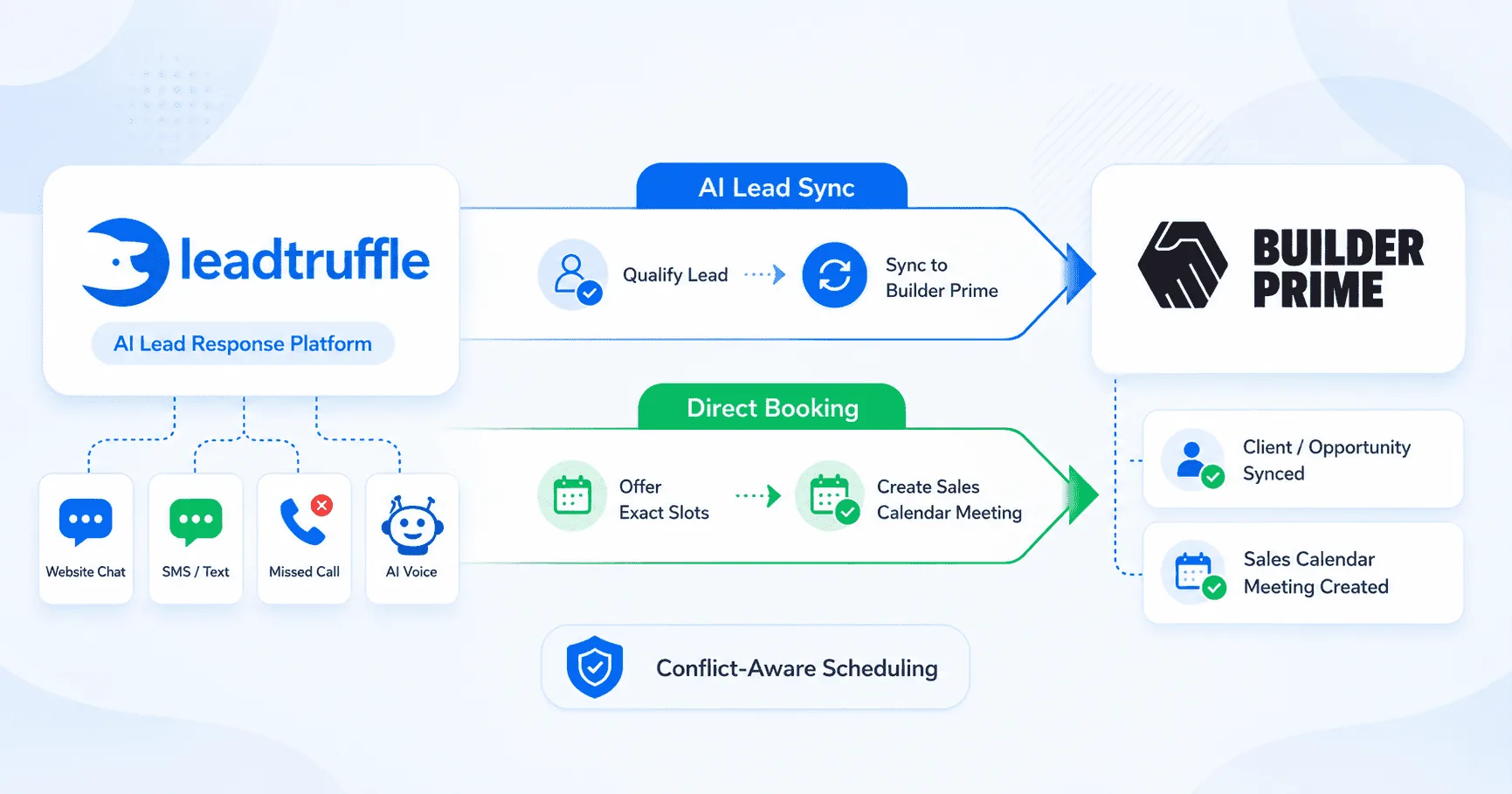
tl;dr: LeadTruffle now connects directly with Builder Prime. Once connected, LeadTruffle can send qualified leads into Builder Prime as Clients / Opportunities, then create Sales Calendar meetings when a homeowner confirms an appointment time with the AI.
For home service contractors, this helps reduce manual data entry, speed up follow-up, and keep new customers from getting stuck in a separate inbox, chat thread, or lead platform.
If your team already uses Builder Prime to manage customers, opportunities, and sales appointments, this integration helps connect the first conversation to the rest of your sales process.
What the LeadTruffle Builder Prime Integration Does
Builder Prime is where many contractors manage customers, opportunities, sales activity, and appointments. LeadTruffle helps with the front end of the process: capturing new leads, following up quickly, qualifying the customer, and moving them toward a booked appointment.
With the Builder Prime integration, LeadTruffle can:
- Push qualified leads into Builder Prime
- Create or update Builder Prime Clients / Opportunities
- Let AI offer appointment times during text or voice conversations
- Create Builder Prime Sales Calendar meetings after a customer confirms
- Check Builder Prime meetings to avoid booking over existing appointments
- Support booking across multiple assigned employees
- Keep integration logs for lead sync and meeting creation
If you are comparing this with other connected tools, the LeadTruffle integrations page gives a broader look at how LeadTruffle connects with CRMs, lead sources, and home service workflows.
How Lead Sync Works
When LeadTruffle qualifies a lead, it can send that lead into Builder Prime.
In Builder Prime, the main customer contact record is a Client. A Lead / Opportunity is attached to that client. In most cases, LeadTruffle creates or updates the Builder Prime Client so your team can keep working from Builder Prime without retyping the same information.
LeadTruffle can sync leads from channels like:
- Website chat
- Website forms
- Missed-call text-back
- AI voice calls
- Yelp
- Thumbtack
- Angi
- Google Local Services Ads
If the customer already exists in Builder Prime, LeadTruffle can update the existing record instead of creating a duplicate. If there is no safe match, LeadTruffle creates a new Client / Opportunity.
This helps your team avoid copy-paste work and keeps important lead details from getting lost in texts, emails, call notes, or marketplace messages.
AI Booking Into Builder Prime
The integration also supports direct AI booking.
That means LeadTruffle’s AI can offer available appointment times during a text or voice conversation. Once the homeowner chooses and confirms a specific time, LeadTruffle creates a meeting on the Builder Prime Sales Calendar.
A typical booking flow looks like this:
- A homeowner contacts your business through webchat, missed call, form, email, or voice.
- LeadTruffle responds and qualifies the lead.
- The AI checks the booking rules you set in LeadTruffle.
- The AI offers available appointment times.
- The customer confirms an exact slot.
- LeadTruffle syncs the customer into Builder Prime.
- LeadTruffle creates the Builder Prime Sales Calendar meeting.
- Your team sees the appointment in Builder Prime.
This helps reduce the back-and-forth that usually happens when a customer says, “Do you have anything tomorrow?” or “Can someone come next week?”
Availability and Conflict Checking
Builder Prime booking in LeadTruffle uses availability windows that you configure inside LeadTruffle.
You can set rules such as:
- Which days are available
- What hours should be offered
- How long each appointment should be
- How much notice is required before booking
- How many days ahead the AI can offer times
- Which Builder Prime employees should be bookable
LeadTruffle then checks Builder Prime meetings for the selected employees and removes times that are already taken. This helps make sure the AI only offers appointment times that should actually be available.
The integration also supports multiple employees. If you assign more than one team member, LeadTruffle can look across the group and offer the earliest available slots.
AI Voice Booking Support
Builder Prime booking also works with LeadTruffle’s AI voice agent.
That means a caller can speak with the AI, answer qualification questions, and confirm an available appointment time over the phone. After the customer confirms, LeadTruffle can create the Builder Prime meeting and connect it to the right customer/opportunity.
This is especially useful for:
- After-hours calls
- Overflow calls
- Missed-call recovery
- Busy seasons when your office team cannot answer every call live
If phone calls are a major lead source for your business, LeadTruffle’s missed-call text-back can also help keep callers engaged when your team cannot pick up right away.
Where Builder Prime Leads Can Come From
The Builder Prime lead sync and booking flow can work across multiple LeadTruffle lead channels.
For website traffic, the website texting widget can turn visitors into text conversations and help collect the information your team needs before a lead reaches Builder Prime.
For paid lead sources, LeadTruffle can also help with follow-up from:
- Google Local Services Ads
- Yelp leads
- Thumbtack leads
- Angi leads
This matters because leads do not always come from one place. A homeowner may call after hours, fill out a form, start a website chat, or send a request through a marketplace. LeadTruffle helps bring those conversations into one workflow and move qualified leads into Builder Prime.
What Gets Sent to Builder Prime
For each qualified lead, LeadTruffle can send the key customer and job details your team needs.
This may include:
- Customer name
- Phone number
- Email address
- Service address, when collected
- Lead source
- Service request
- Job notes
- Conversation summary
- Appointment time, if the lead booked through AI
- Assigned employee and meeting type, when configured
The exact setup depends on how your team wants Builder Prime configured. For example, some businesses may want a specific lead source, salesperson, class, or project type sent into Builder Prime.
How to Connect Builder Prime to LeadTruffle
To connect Builder Prime with LeadTruffle, you will need:
- Your Builder Prime subdomain
- Your Builder Prime API key / secret key
- Meeting type for AI-booked appointments
- Assigned employee or employees for booking
- Availability settings
- Required fields before booking, such as phone, email, or address
Inside LeadTruffle, the setup happens in the External Integrations area. Your admin can enter the Builder Prime connection details, test the connection, and configure booking options.
You do not have to turn on every feature at once. Some teams may start with lead sync first, then add AI booking once their availability rules are ready.
Turning On AI Booking
AI booking is optional. Some contractors may only want LeadTruffle to sync leads into Builder Prime, while others may want the AI to book appointments directly.
To use AI booking, your team will configure:
- AI booking toggle
- Builder Prime meeting type
- Assigned employee or employees
- Reminder settings
- Required customer fields
- Availability windows
- Timezone
- Slot duration
- Minimum notice
- Days ahead to offer
LeadTruffle can also preview availability, so your team can check what appointment times the AI may offer before turning booking fully live.
The AI is not meant to invent times or make up schedule details. It follows the available slots and booking rules your team sets.
Duplicate Protection and Logs
Lead sync needs to be careful. If the same customer comes through multiple paths, like a website form and a missed call, you do not want duplicate records created in Builder Prime.
LeadTruffle includes safeguards to reduce duplicate Builder Prime writes for the same customer. The integration checks for existing records, uses stored Builder Prime IDs when available, and includes protections around near-simultaneous sync attempts.
LeadTruffle also keeps logs for:
- Builder Prime lead sync
- Builder Prime meeting creation
- Skipped syncs
- Successful syncs
- Booking errors
- Connection issues
These logs make it easier to troubleshoot if something does not sync or if a required field is missing.
Best Builder Prime Use Cases for Contractors
The Builder Prime integration is flexible, but these are some common ways contractors can use it.
Replacement and Remodeling Companies
If your team sells larger projects, LeadTruffle can qualify the homeowner, collect the basic project details, and book a sales appointment in Builder Prime.
Roofing, Windows, Doors, and Exterior Services
LeadTruffle can respond quickly when a homeowner fills out a form or misses your call, then helps schedule the next available estimate slot.
HVAC, Plumbing, and Electrical Companies
For teams that use Builder Prime as part of their sales process, LeadTruffle can capture the lead, qualify urgency, and move the customer into Builder Prime without manual copy-paste.
After-Hours and Missed-Call Follow-Up
If a homeowner reaches out after the office is closed, the AI can still start the conversation, collect details, and offer appointment times based on your rules.
For teams that need more coverage outside business hours, LeadTruffle’s automated follow-up can help keep leads moving when your office is closed or busy.
Benefits of Connecting LeadTruffle With Builder Prime
The LeadTruffle + Builder Prime integration is built to help contractors move faster from new lead to booked appointment.
The main benefits are:
- Faster lead response
- Less manual data entry
- Fewer missed opportunities
- Cleaner customer records in Builder Prime
- Easier appointment booking
- Better handoff from AI to your office team
- More control over what the AI can and cannot do
Instead of asking your team to manually move every lead from chat, phone, email, and paid lead platforms into Builder Prime, LeadTruffle can handle more of that workflow automatically.
If you want to estimate how faster response and better follow-up could affect your business, the LeadTruffle ROI calculator can help you think through lead volume, close rate, and average job value.
Book More Builder Prime Appointments Without Extra Manual Work
The LeadTruffle + Builder Prime integration is built to help contractors move faster from new lead to booked appointment.
LeadTruffle handles the early conversation. Builder Prime stays updated with the customer and appointment details. Your team gets a cleaner workflow, faster response times, and fewer leads slipping through the cracks.
For contractors who want faster follow-up and less manual copy-paste, this integration can make the front office easier to manage.
Related Reading
- Website Texting Widget for Home Service Leads
- Missed-Call Text-Back for Contractors
- AI Voice Agent for Home Service Businesses
- Automated Follow-Up for Leads
- LeadTruffle Integrations
Want to see how this could work for your business? Book a demo or learn more about LeadTruffle.