
 Log In
LeadTruffle Insights
Introducing LeadTruffle Assistant: Your AI Account Assistant
Meet LeadTruffle Assistant, an in-app AI tool that can inspect your account, diagnose setup issues, and prepare safe changes for your approval.
Quick Answer
tl;dr: LeadTruffle Assistant is a new AI assistant built into the LeadTruffle dashboard. It can inspect your account setup, answer questions about how LeadTruffle is configured, diagnose problems with prompts, booking, and integrations, and prepare supported updates for your approval. It is scoped to your company and will always ask for approval before making a change.
LeadTruffle has grown into a fairly deep platform. A single account may have several AI agents, multiple lead sources, CRM connections, booking rules, company information, service areas, follow-up schedules, and channel-specific prompts.
That flexibility is useful, but it can also make a simple question harder than it should be:
- Why did the AI give this lead the wrong price?
- Which prompt controls our missed-call text-back agent?
- Is AI booking configured correctly?
- Why did this lead inquiry fail to sync to our CRM?
- Where should I update a service or policy that applies across every channel?
Today, we are introducing LeadTruffle Assistant, an account-aware AI assistant designed to answer those questions using your actual LeadTruffle setup.
What Is LeadTruffle Assistant?
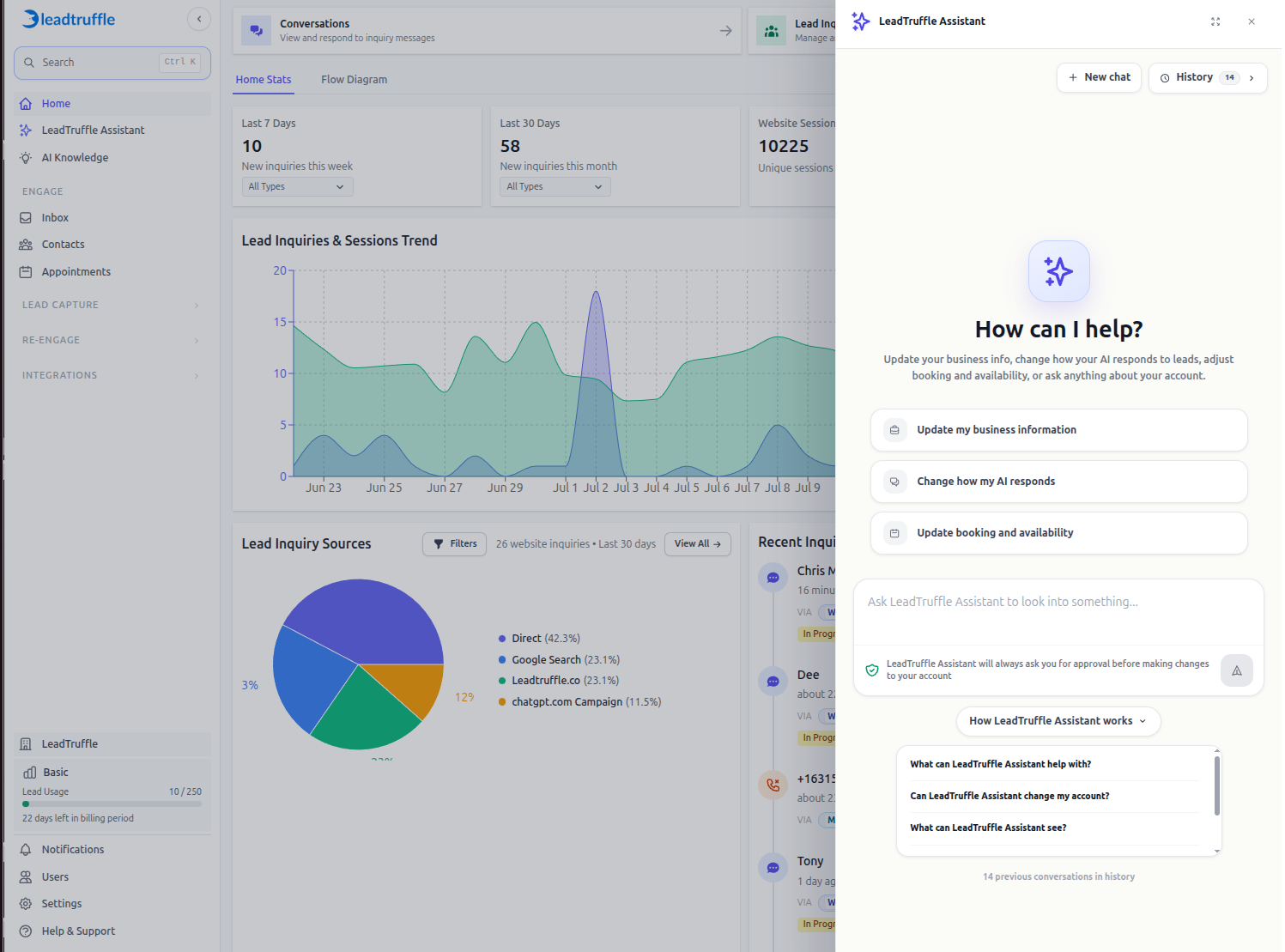
LeadTruffle Assistant is available inside the LeadTruffle dashboard. You can open it from the left sidebar or from contextual prompts on supported settings pages.
Unlike a general chatbot, LeadTruffle Assistant can inspect the configuration for the company you are currently working in. It can review active agents, prompts, company information, lead inquiries, booking setup, integration state, and relevant LeadTruffle help documentation before it answers.
That account context helps it move beyond generic advice. If you ask why your AI mentioned an outdated service-call fee, for example, LeadTruffle Assistant can help determine whether the incorrect value lives in your shared company pricing information or in one channel-specific prompt.
You can open LeadTruffle Assistant here after signing in to your LeadTruffle account.
An Assistant for Your Account, Not Your Leads
LeadTruffle Assistant has a different job from the AI agents that communicate with prospective customers.
Lead-facing agents respond through website texting, webchat, SMS, email, marketplace messaging, or AI voice. They qualify lead inquiries, collect useful details, and help move customers toward a booked appointment.
LeadTruffle Assistant works behind the scenes with your team. It helps you understand and manage the LeadTruffle account those agents depend on.
That distinction keeps the experience clear:
- Lead-facing AI agents communicate with prospective customers.
- LeadTruffle Assistant helps your staff inspect, troubleshoot, and update the account.
What Can LeadTruffle Assistant Help With?
Understand Your Current Setup
You can ask LeadTruffle Assistant which agents are active, where a prompt is configured, what company information is available to the AI, or how a particular lead source is set up.
This is especially useful when your account has grown across several channels. The prompt used for website texting may be different from the prompt used for Yelp, Thumbtack, webchat, AI voice, or an inbound email address.
Diagnose Unexpected AI Responses
When an AI response looks wrong, the visible message is only the starting point. The underlying cause may be shared company information, a channel prompt, booking instructions, or details already present in the conversation.
LeadTruffle Assistant can inspect the relevant configuration and help identify the smallest useful fix. That makes it easier to improve your AI lead qualification without rewriting prompts that are already working.
Troubleshoot Booking and Integrations
AI booking can depend on several pieces working together:
- A connected booking provider or LeadTruffle calendar
- Availability rules and scheduling windows
- The booking mode selected for the lead source
- Prompt instructions that tell the AI when and how to book
- The information collected from the contact
LeadTruffle Assistant can examine those layers together. It can also review connection state and recent integration summaries when you are trying to understand a CRM sync or booking issue.
For a broader view of supported CRM and lead-source connections, visit the LeadTruffle integrations page.
Find the Right Help Article
You can ask a setup or how-to question without searching through the help center manually. LeadTruffle Assistant can search LeadTruffle documentation and return a direct link to the most relevant article.
Prepare Changes for Review
LeadTruffle Assistant can prepare supported updates to areas such as company information, prompts, service areas, and selected booking configuration. If one issue spans several settings or prompts, it can prepare a grouped repair plan so you can review the related changes together.
You Stay in Control of Every Change
LeadTruffle Assistant does not silently edit your account.
When it prepares a supported update, it shows the proposed change for review. Prompt updates include a before-and-after comparison so you can see what will be removed and what will be added. Nothing is applied until an authorized user approves it.
LeadTruffle also checks the current account state again when approval happens. If someone changed the same setting after the proposal was created, the approval can stop and ask for a fresh review instead of overwriting newer work.
The current role model is straightforward:
- Standard Users can ask questions and run read-only diagnostics.
- Managers and Administrators can also review and approve supported changes.
- Agency users can use LeadTruffle Assistant while working inside companies they manage.
LeadTruffle Assistant is scoped to the current company. It is not designed to expose another company’s data, API keys, passwords, or authentication credentials.
Example Questions to Try
Here are a few useful ways to start:
- “Which AI agents are active for this company?”
- “The AI told a lead our service-call fee is $50, but it should be $100. Help me find and fix it.”
- “Why did the website texting agent ask for the address twice?”
- “Check whether AI booking is ready and tell me what is blocking it.”
- “Why did this lead inquiry fail to sync to our CRM?”
- “Which prompt controls our Thumbtack replies?”
- “Find the setup guide for webchat.”
Specific details help. Include a contact’s phone number or email, a lead inquiry ID, a prompt name, a lead source, or the CRM provider when you have it.
Why We Built It
LeadTruffle brings lead capture, qualification, booking, messaging, and integrations into one system. As those capabilities expand, teams need a faster way to understand how the pieces fit together.
LeadTruffle Assistant gives company users a single place to ask account-specific questions. It also gives teams a safer path from diagnosis to action because proposed updates stay behind a clear human approval step.
The goal is simple: spend less time hunting through settings and more time improving how your business responds to new lead inquiries.
Available Now in LeadTruffle
LeadTruffle Assistant is available now from the LeadTruffle dashboard. Sign in and select LeadTruffle Assistant from the sidebar to start a conversation, or open the assistant directly.
If you are not yet using LeadTruffle and want to see how the platform captures, qualifies, and books home service leads, schedule a demo.