 Log In
Meet LeadTruffle Assistant, your AI account assistant.
Ask why a lead didn't book, why SMS failed, or which prompt is causing a bad reply. LeadTruffle Assistant investigates your account and prepares a fix. You review every change before it goes live.
Included for every LeadTruffle company. No setup required, just open it from your dashboard sidebar.
Investigates your setup across every system, proposes a fix, and waits for your approval.




Quick Answer
tl;dr: LeadTruffle Assistant is an AI account assistant built into every LeadTruffle dashboard. Ask it why a lead didn't book, why SMS failed, or which prompt is causing a bad reply, and it investigates your setup and drafts a fix. Every change is a pending proposal that a Manager or Administrator must review and approve, nothing is ever applied automatically.
An assistant for your account, not your leads.
LeadTruffle Assistant doesn't talk to your customers. It looks at your company's LeadTruffle setup, including prompts, booking configuration, CRM integrations, SMS, and notifications and follow-ups, so you can quickly understand what's happening and why.
- Scoped to your company only. No cross-account visibility, ever.
- Reads redacted, safe configuration data. Never credentials, API keys, or tokens.
- Available to every user role, with deeper access for Managers and Administrators. See roles and permissions.
- Built into your dashboard sidebar. No extra login, no separate tool.
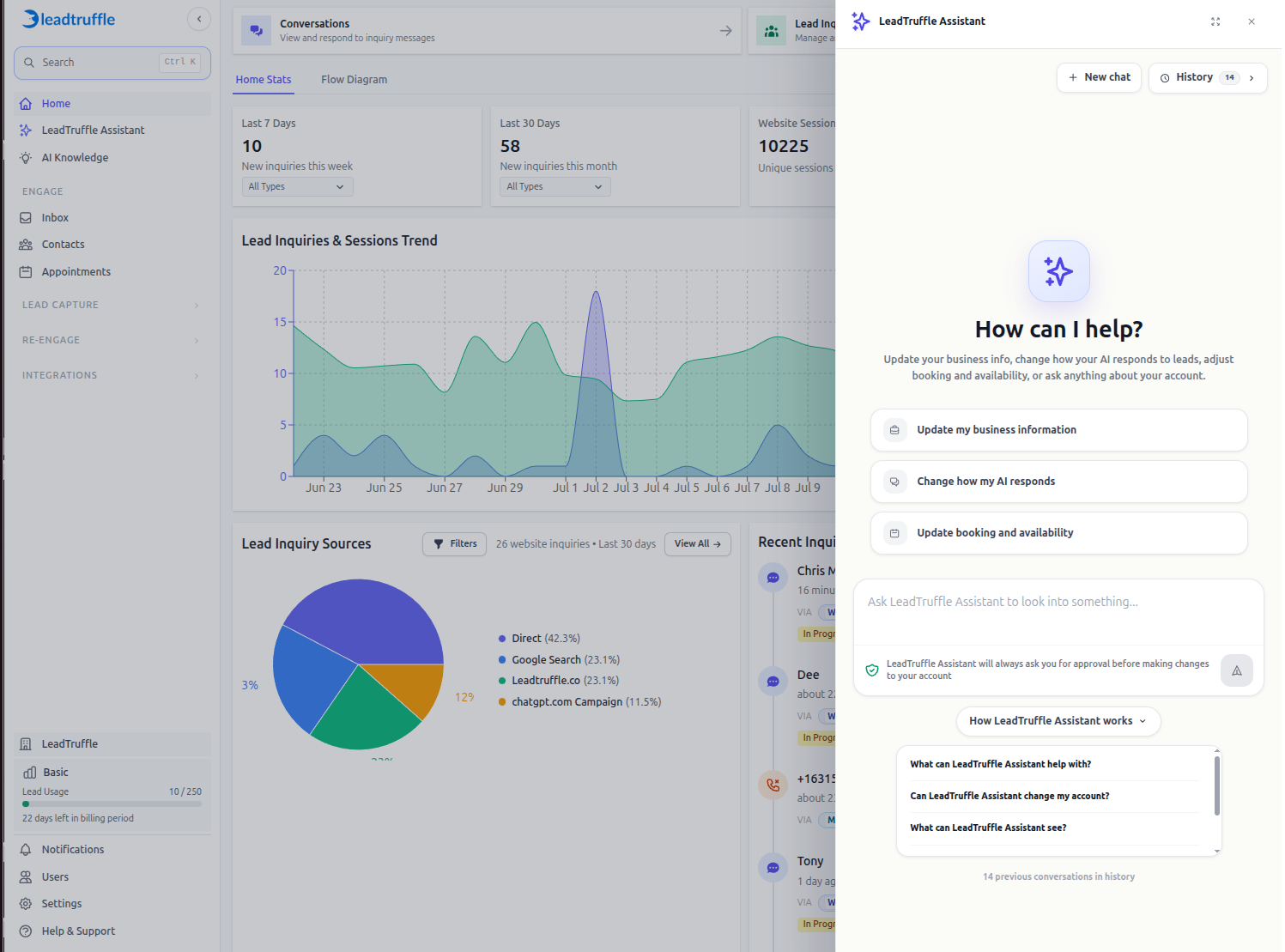
Answers to the questions your team asks every day.
From "why didn't this lead book" to "is SMS working," LeadTruffle Assistant investigates and explains, in plain language.
Prompts and AI Behavior
Find the exact prompt behind a bad response across webchat, texting, voice, Yelp, Thumbtack, and more, then get a minimal, targeted fix.
Booking and Availability
Trace a lead inquiry end to end to see why an appointment wasn't created, and check calendar or provider availability conflicts.
CRM Sync
See recent HouseCall Pro, Jobber, ServiceTitan, or Workiz sync failures and setup gaps, explained without the technical jargon.
SMS and 10DLC Health
Check texting readiness, opt-outs, blocked numbers, and "SMS Init Failed" errors for a specific lead in seconds.
Notifications and Follow-Ups
Confirm whether the right notifications and follow-up sequences are active, and fix them if they're not.
Help and Setup Guidance
Get pointed to the exact LeadTruffle help article for your setup question instead of searching a help center yourself.
Reporting and Insights
Ask for a chart and get one. Lead volume trends, lead source mix, and other breakdowns, rendered instantly, no exporting to a spreadsheet.
Every change is proposed, reviewed, and approved by a human.
LeadTruffle Assistant never edits your account directly. Here's the review flow behind every suggested change.
Ask a question
Describe the issue in plain language. A phone number, lead ID, or channel name helps it move faster.
It investigates
LeadTruffle Assistant checks the relevant prompts, booking data, CRM logs, or messaging state for your account.
It proposes a fix
For Managers and Admins, it prepares a reviewable change with a before/after diff and risk notes. Nothing is applied yet.
You approve
Review and approve to apply the change. If anything changed since the proposal, it's rejected and re-checked automatically.
Real answers, from a real account.
These are actual LeadTruffle Assistant conversations, not mockups. Ask a plain-language question and get a real, checkable answer back.
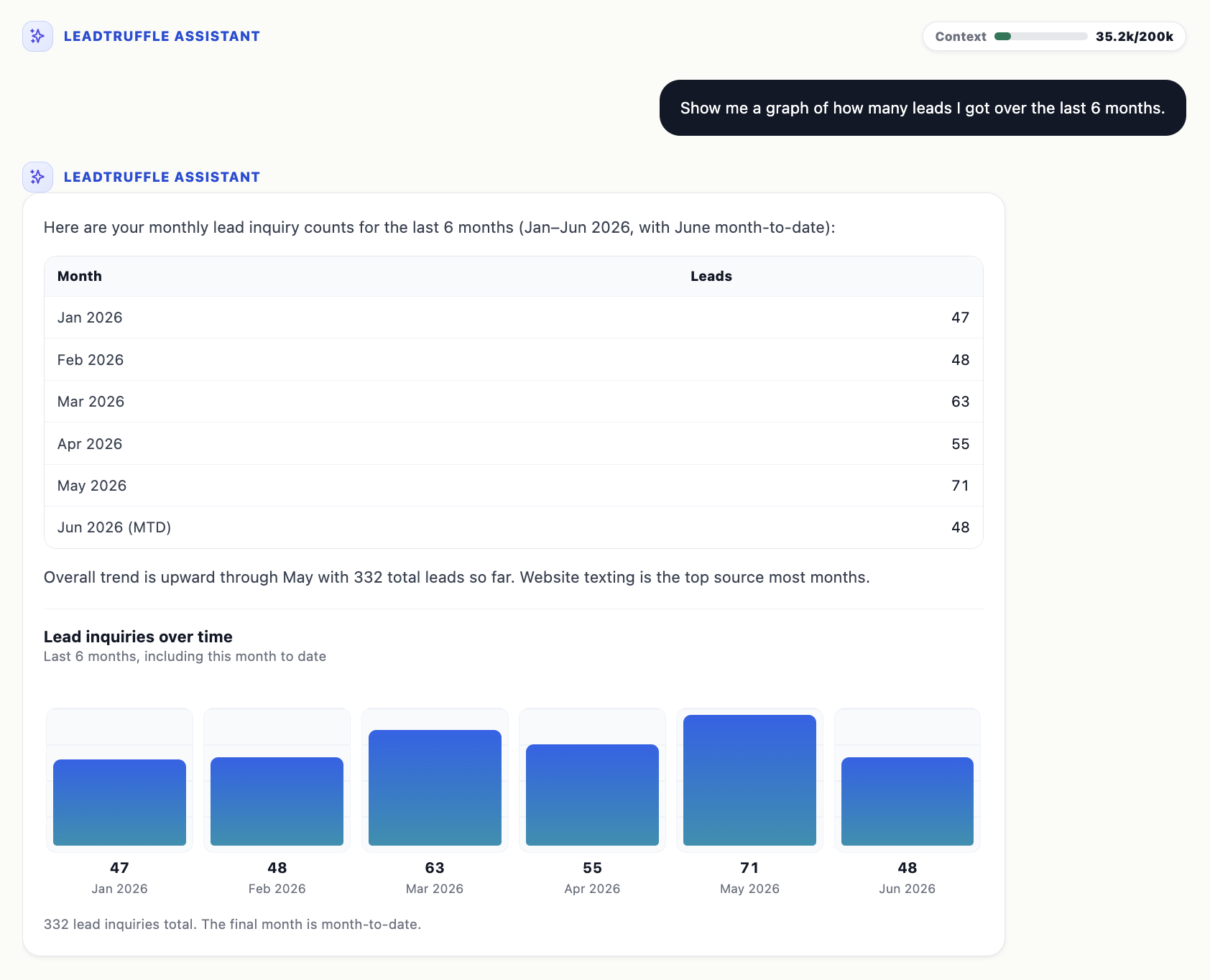
Ask for a trend. Get a chart.
"Show me a graph of how many leads I got over the last 6 months." LeadTruffle Assistant pulls the real numbers and renders them, no export to a spreadsheet required.
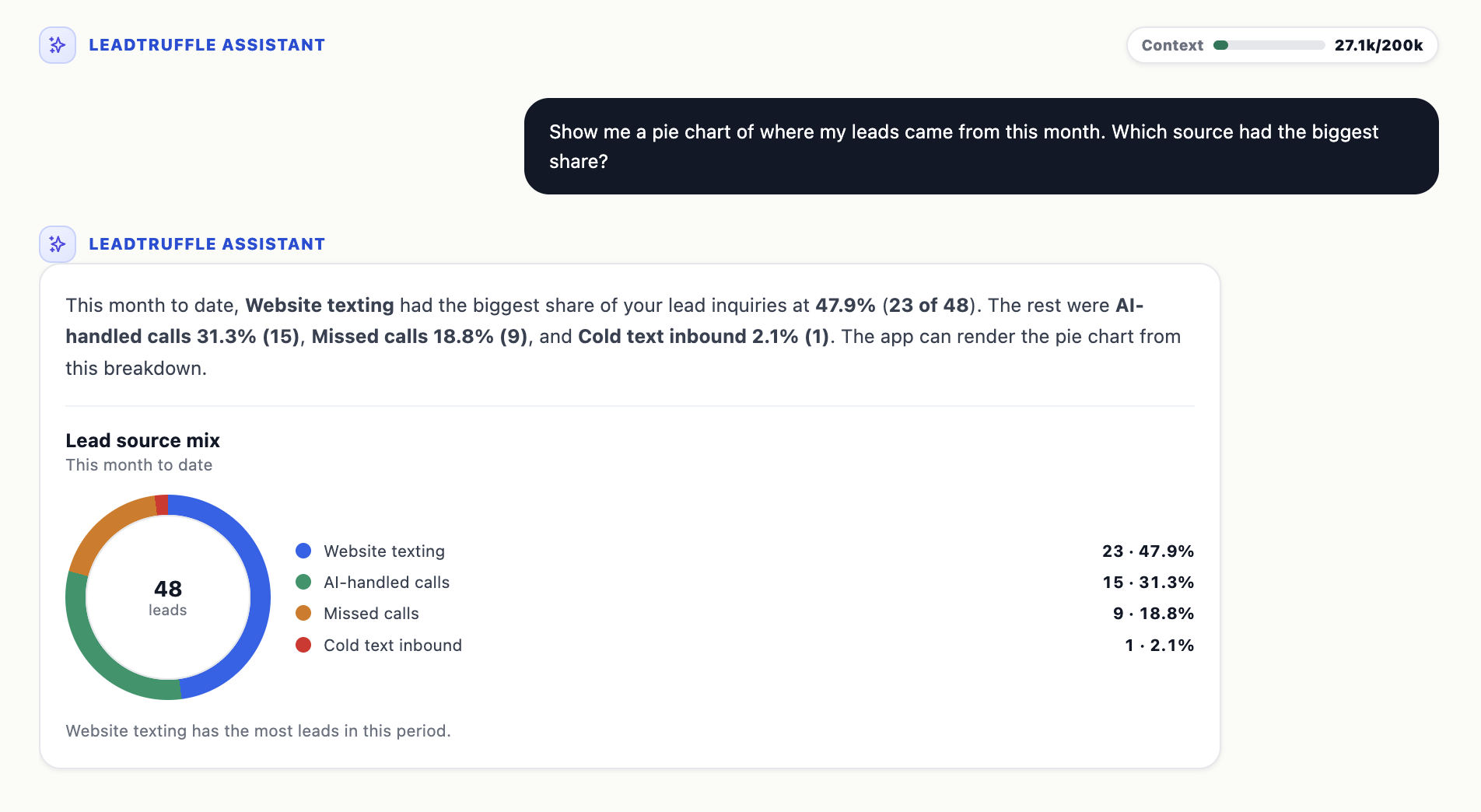
Drill into the details.
"Show me a pie chart of where my leads came from this month." It breaks down the lead source mix and calls out the biggest share automatically.
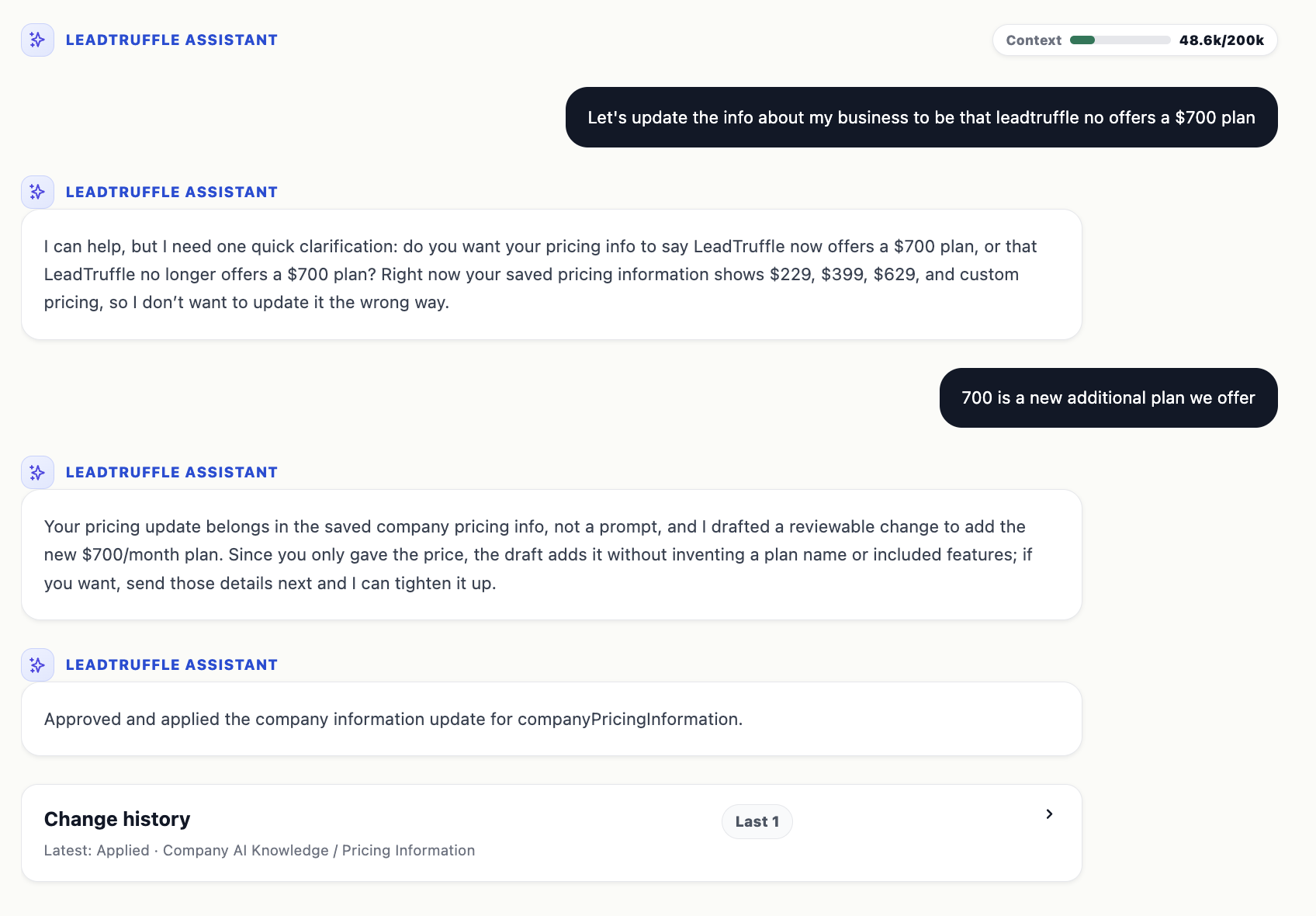
Smart enough to double-check.
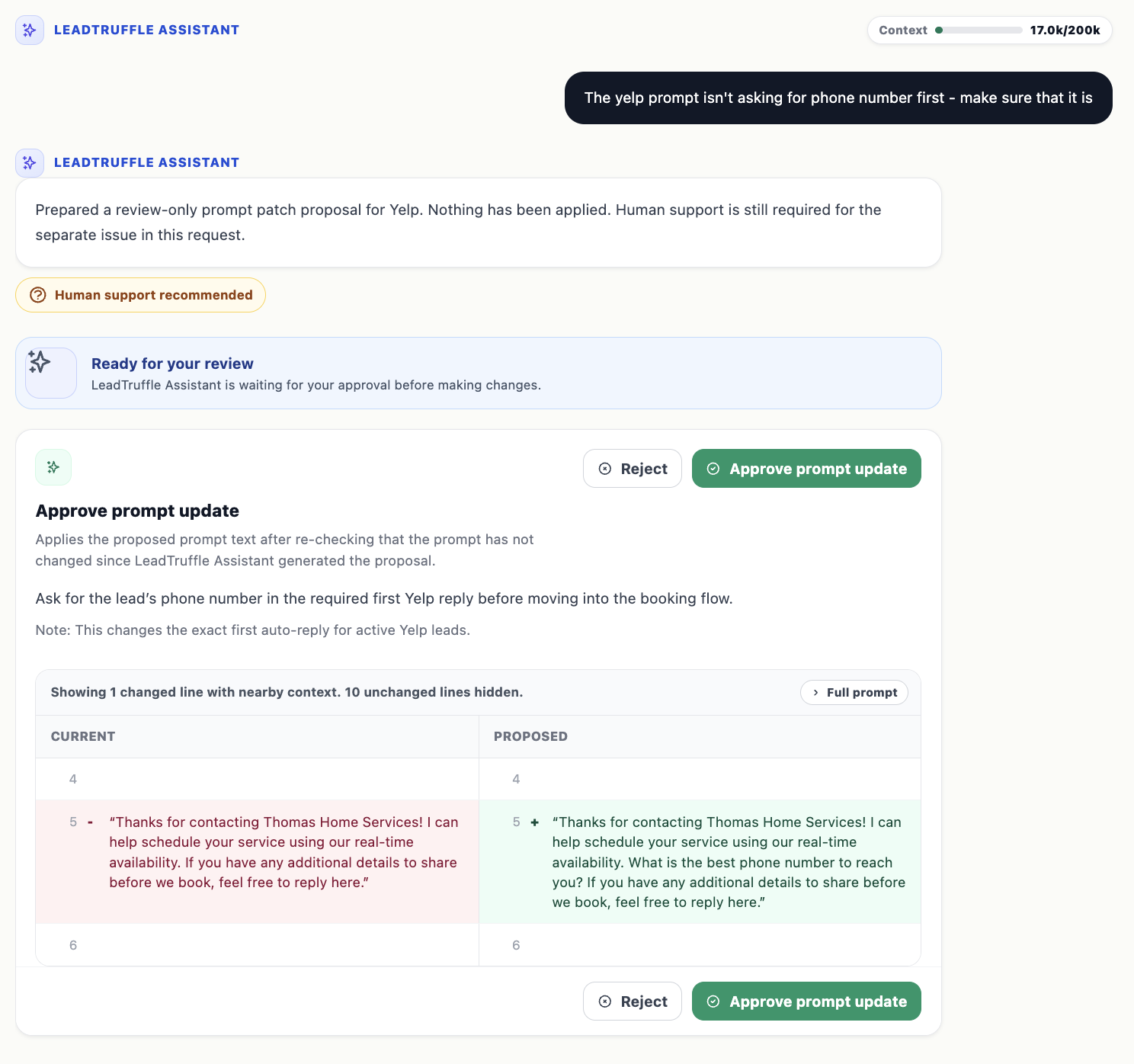
Ask for an ambiguous change and it asks a clarifying question first, then drafts a reviewable update instead of guessing at what you meant.
Every fix shows its diff.
Proposes the exact prompt text change, side by side with the current version, and waits for a Manager or Admin to approve before anything goes live.
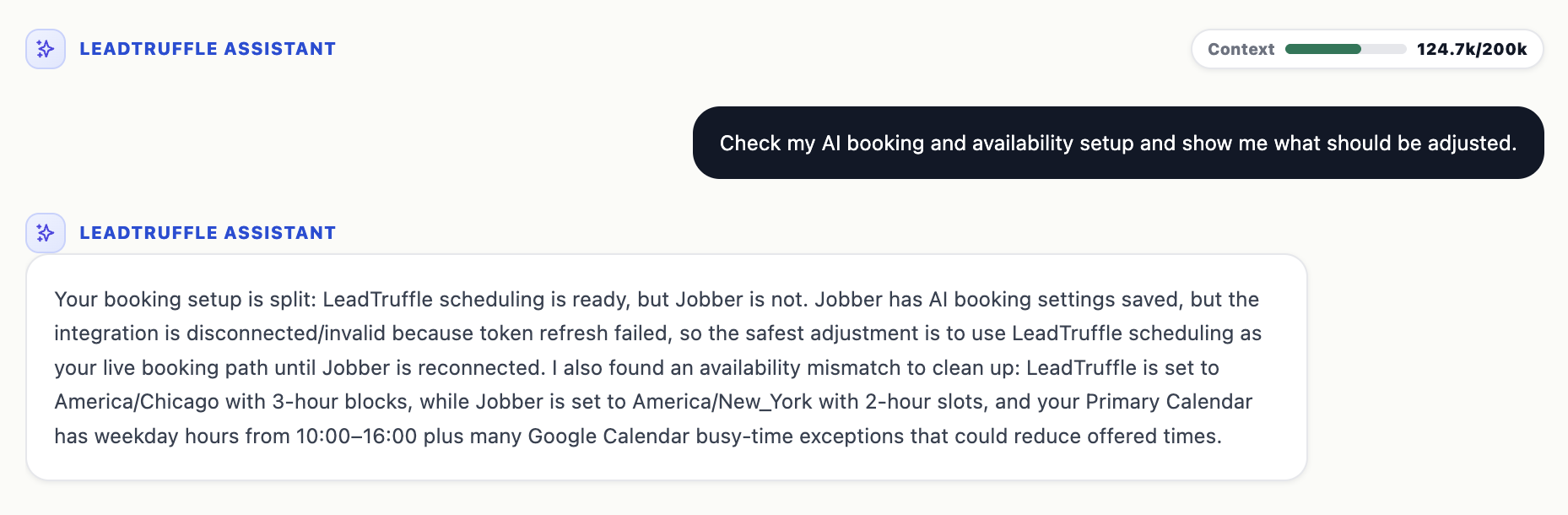
Diagnoses across every connected system at once.
"Check my AI booking and availability setup and show me what should be adjusted." It cross-checks LeadTruffle scheduling, the Jobber connection, timezones, and calendar exceptions in one pass.
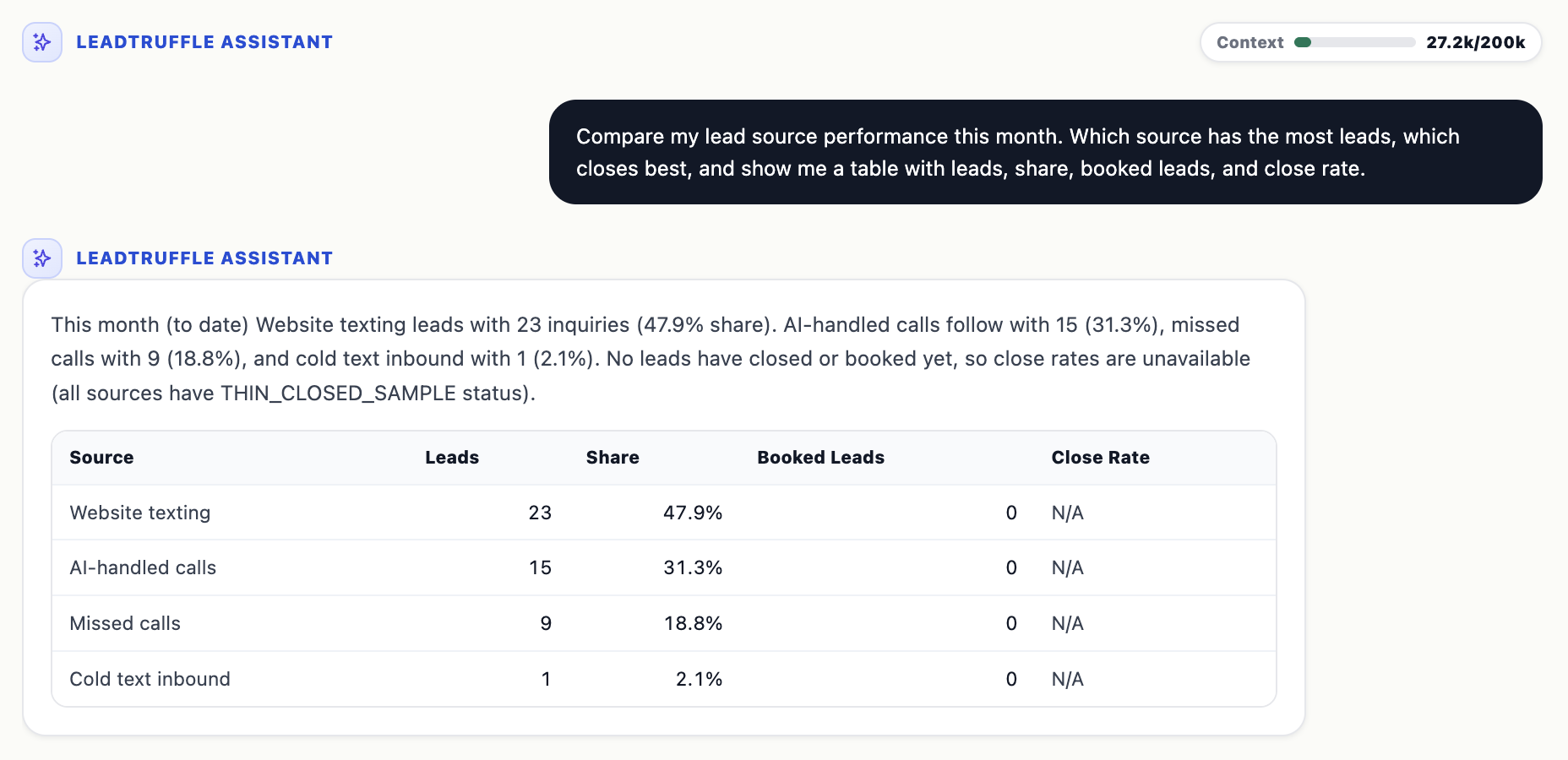
Reports come with the caveats, not just the numbers.
Ask it to compare lead source performance and it returns a real table, and tells you plainly when there isn't enough closed-lead data yet to calculate a close rate.
Who can use LeadTruffle Assistant?
Ask, diagnose, learn
Every user gets full read-only access. Ask about setup, prompts, booking, or SMS anytime. Change requests route to a Manager or Admin.
Propose and approve
Get everything Standard Users get, plus the ability to request, review, and approve account changes across prompts, booking, and CRM config.
Scoped, secure access
Agency users get a company-scoped view for accounts in their agency. Internal support can run diagnostics on any selected company.
Built to reduce guesswork, not add it.
In internal evaluation scenarios, LeadTruffle Assistant's current architecture resolved account
questions correctly and rarely needed to hand off to human support, a meaningful jump from earlier
versions.
*Internal, mocked evaluation scenarios, not a guarantee of production results. See our
product announcement for details.
Frequently asked questions
What is LeadTruffle Assistant?
LeadTruffle Assistant is an AI account assistant built into LeadTruffle. It inspects your company's setup, including prompts, booking configuration, CRM integrations, SMS, notifications, and follow-ups, diagnoses issues, and prepares changes for you to review and approve before anything is applied.
Can LeadTruffle Assistant make changes to my account without asking me?
No. LeadTruffle Assistant never applies a change directly. Every proposed update, whether it's a prompt edit, a booking fix, or a CRM field change, becomes a pending action that a Manager or Administrator must review and approve first. If your account changes in the meantime, the approval is automatically rejected as stale and a fresh proposal is generated.
Who can use LeadTruffle Assistant?
Every LeadTruffle company user can use LeadTruffle Assistant for read-only diagnostics and questions. Managers and Administrators can also propose and approve changes. Agency users get a scoped view for the companies in their agency.
What can LeadTruffle Assistant diagnose?
It can explain which AI agents are active, which prompt controls a specific response, why a lead didn't book, whether SMS and 10DLC are configured correctly, why a CRM sync failed, whether notifications and follow-ups are enabled, and where to find the right help article, all scoped to your company only.
Does LeadTruffle Assistant have access to my credentials or API keys?
No. LeadTruffle Assistant is explicitly restricted from viewing or proposing changes to credentials, API keys, tokens, or OAuth connections. It works only with safe, redacted configuration fields.
Which integrations does LeadTruffle Assistant support?
LeadTruffle Assistant can read diagnostics and propose safe configuration changes for HouseCall Pro, Jobber, ServiceTitan, and Workiz.
Can LeadTruffle Assistant show me charts and reports?
Yes. Ask LeadTruffle Assistant a question like how many leads you got over a time period or where your leads came from, and it returns a real chart, such as a bar chart of monthly lead volume or a pie chart of lead source mix, built from your account's actual data.
How much does LeadTruffle Assistant cost?
LeadTruffle Assistant is included with every LeadTruffle plan at no extra cost. See our pricing page for full plan details.
Explore related resources
Introducing LeadTruffle Assistant
Read the original product announcement and see it in action.
See all LeadTruffle integrations
HouseCall Pro, Jobber, ServiceTitan, Workiz, and more.
AI Lead Qualification
See how LeadTruffle qualifies every lead automatically, 24/7.
Unified Lead Inbox
Every channel, every lead, one place: the setup Assistant helps you keep healthy.
Schedule a demo
See LeadTruffle Assistant live on a real account setup.
Getting started with LeadTruffle Assistant
Step by step setup and first question walkthroughs.
LeadTruffle Assistant is already in your dashboard.
Sign in and select LeadTruffle Assistant from the sidebar, or schedule a demo to see it walk through a live account.