 Log In
 Yelp
Yelp Yelp Integration
Connect Yelp to the rest of your lead workflow
LeadTruffle helps home service teams bring Yelp leads into one inbox, support image-based conversations, switch to manual mode any time, continue follow-up over email, and push the lead into the CRM they use to track conversions.
- Connect Yelp to LeadTruffle through Zapier
- Support image-based Yelp conversations inside the workflow
- Take over manually whenever your team wants to reply
- Continue estimates and follow-up over email when contact info is available
- Launch AI email campaigns for Yelp leads that need more nurture
- Push Yelp source and lead data into your CRM for conversion tracking
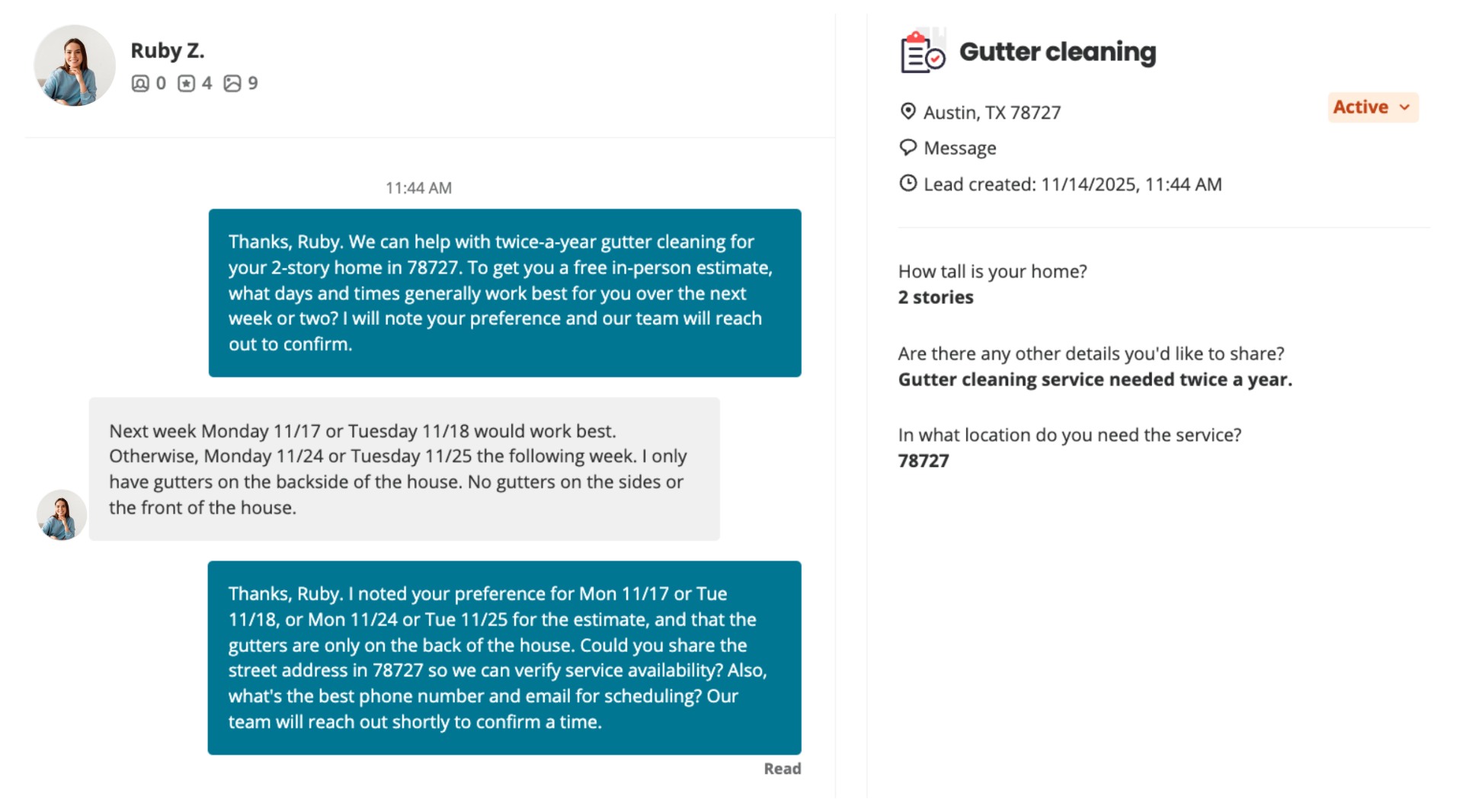
Quick Answer
tl;dr: LeadTruffle connects Yelp through Zapier, brings Yelp leads into the same inbox as your other sources, supports conversations that include images, lets your team switch into manual mode instantly, and gives you a path to email follow-up, AI email campaigns, and CRM sync once customer contact details are available. If you want the narrower instant reply explainer, go to /yelp-auto-responder/.
What Makes This Page Different
Setup, control, and downstream workflow for Yelp
Beyond reply speed, this covers how Yelp fits into your LeadTruffle system after setup, including support, manual control, email handoff, and CRM reporting.
Zapier Setup + Verification
The Yelp setup is Zapier-based. After the connection is live, the full workflow covers mapping the trigger, testing live message flow, and making sure the lead lands in the right inbox and pipeline.
Images + Manual Control
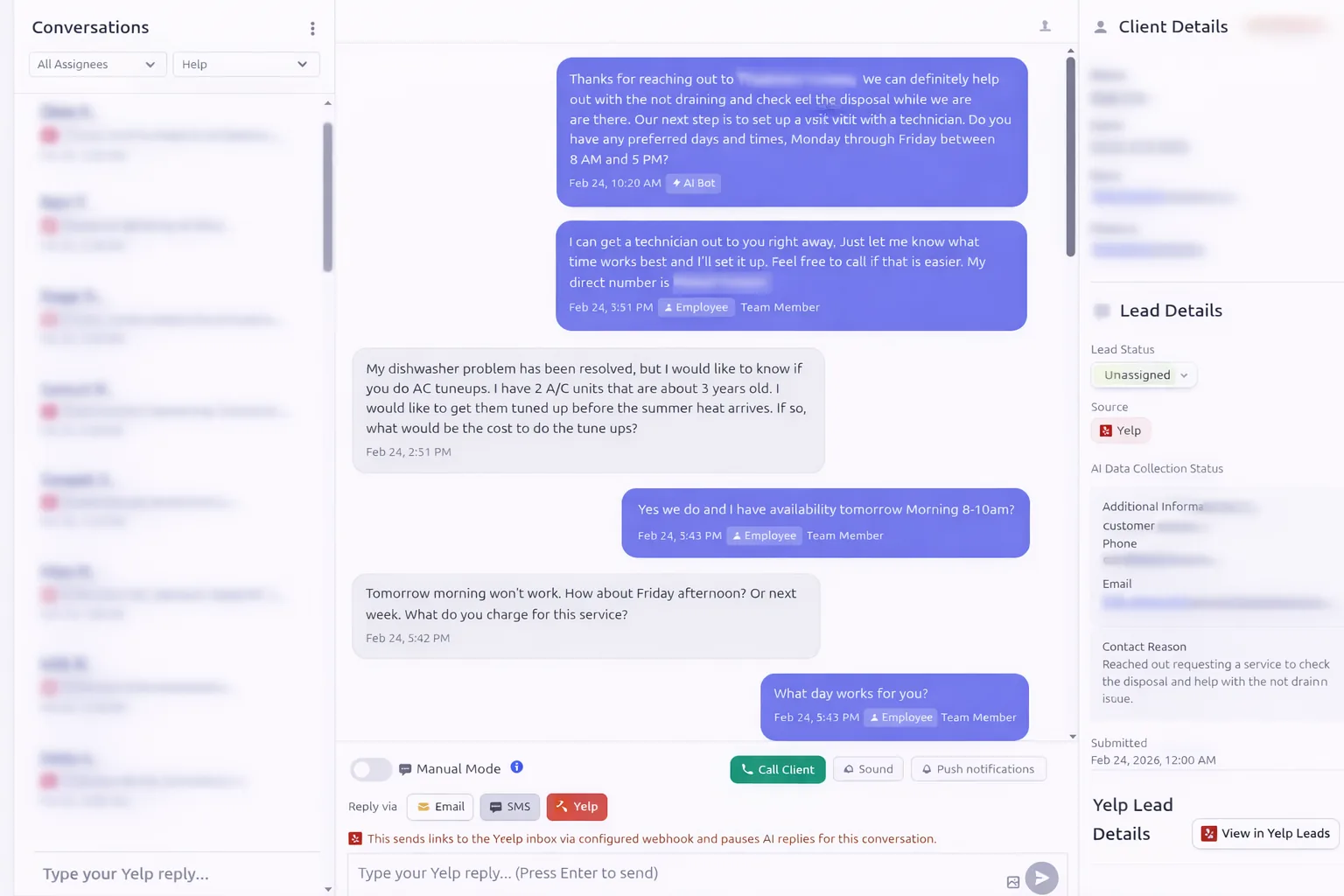
LeadTruffle supports Yelp conversations that include images, and your team can pause AI and take over manually any time without losing the thread context.
Email + CRM Workflow
When Yelp exposes temporary contact details or the customer shares an email, your team can continue follow-up outside Yelp, launch AI email campaigns, and push the lead into your CRM for conversion tracking.
Video Tutorial
Watch the Yelp workflow in action
If you want to see the Yelp conversation flow before setting anything up, this walkthrough shows how Leads come in, how the inbox behaves, and how the team can keep moving the lead toward booking.

Watch the full workflow from the first Yelp ping to follow-up and booking.
Setup + Support
How the Yelp integration gets installed and verified
Yelp still connects through Zapier, but the important part is not just flipping the zap on. You want to verify the message flow, test routing, and make sure the lead can move into follow-up and CRM steps after the first interaction.
We onboard every customer and can set this up for you. If you want to review the steps in advance, see the Yelp setup help article .
1. Connect Yelp to LeadTruffle through Zapier
Use the Yelp trigger inside Zapier, map the fields into LeadTruffle, and activate the automation so new Yelp leads route into your LeadTruffle inbox.
2. Verify a live message and routing flow
Test the setup end to end so you know Yelp messages, images, temporary contact details, and source attribution are arriving correctly before you rely on it.
3. Choose how much automation you want
You can use Yelp for full AI handling, lighter guardrail-based workflows, or manual-first processes where your team reviews and takes over quickly.
4. Push leads into follow-up and CRM workflows
Once the lead is in LeadTruffle, you can sync it to your CRM, keep source attribution, notify your team, and move the conversation into email follow-up when it makes sense.
Zapier setup help
If you need help, we can walk through the Yelp trigger, field mapping, and app connection so the automation is not just installed, but actually usable. We also onboard every customer and can set the Yelp connection up for you.
Testing + troubleshooting
We can help verify message delivery, confirm images and contact details are coming through, and troubleshoot routing if your Yelp flow is not behaving correctly.
Workflow tuning
Once setup is live, we can help you tune manual mode, AI behavior, notifications, and downstream CRM or email steps around how your team actually sells.
Manual Mode + Images
Yelp can stay automated until a human needs to step in
AI can help with the first response, but your team can switch into manual mode instantly, keep replying inside the same conversation, and still work from the same Yelp-originated lead record.
Bring Yelp into the same inbox as everything else
Yelp leads show up beside website chat, missed calls, Angi, Thumbtack, and other sources so your team works one queue instead of checking separate apps.
Support conversations that include images
If the Yelp conversation includes photos, LeadTruffle still keeps that thread context attached so your team can respond with the full picture of the lead.
Move the lead into email follow-up when possible
When Yelp exposes temporary contact details or the customer shares a direct email, your team can continue estimates, scheduling, reminders, and nurture outside the Yelp thread.
Keep reporting tied back to Yelp
Even after the conversation moves into email or your CRM, the lead can stay attributed to Yelp so you can track what actually turned into booked work.
Beyond The First Reply
Yelp leads do not have to stay trapped in a marketplace-only workflow
Once the lead is inside LeadTruffle, your team gets more options than just answering the first message.
Manual takeover anytime
Pause AI and let a rep answer directly while keeping the conversation history, lead details, and Yelp source context visible.
Email handoff for longer follow-up
Some leads need estimates, availability checks, or longer sales cycles. Once contact details are available, email gives your team more room than a marketplace thread.
AI email campaigns for Yelp leads
Quiet leads can move into AI email campaigns for reminders, quote follow-up, reactivation, and longer nurture instead of stalling inside Yelp.
Support for mixed AI + human workflows
LeadTruffle is not all-or-nothing. Yelp can be handled by AI, by humans, or by a workflow where AI starts and your team steps in where it matters most.
CRM + Attribution
Track what Yelp actually turns into
Speed matters, but the bigger operational question is whether the Yelp lead becomes a quote, a scheduled visit, and real revenue. That means keeping the source, context, and follow-up trail intact once the lead moves into your CRM.
LeadTruffle can push Yelp leads, source attribution, conversation context, contact details, and stage updates into tools like Jobber, Housecall Pro, ServiceTitan, HubSpot, and Workiz so your team can keep working from the CRM they already trust.



Push Yelp leads into your CRM
Move Yelp leads into Jobber, Housecall Pro, ServiceTitan, HubSpot, Workiz, and related systems so your team can keep selling from the tools they already use.
Keep source and conversation context
Store that the lead came from Yelp along with transcript context, qualification notes, and customer details so reps are not starting from scratch.
Track conversion stages
Log stage updates like new, quoted, scheduled, booked, and won so Yelp performance can be measured against your other channels.
Connect follow-up activity back to revenue
Email follow-up, manual handoff, and CRM movement can all stay tied to the same Yelp-originated lead for cleaner reporting.
Need the reply-speed version of this story? Visit Yelp Auto Responder. Need the email side of the workflow? Explore AI email campaigns.
FAQ
Yelp Integration FAQ
How do I set up Yelp with Zapier and verify it is working?
You connect Yelp to LeadTruffle through Zapier, map the lead fields, activate the workflow, and then test a live Yelp message so you can confirm routing, source attribution, and contact details are all coming through correctly.
Does the Yelp integration support images?
Yes. LeadTruffle supports Yelp conversations that include images, so your team still gets the full thread context and can respond without losing the details shared in the conversation.
Can my team take over a Yelp conversation manually?
Yes. Your team can switch into manual mode and take over any Yelp conversation while keeping the full transcript, lead details, and Yelp source context in view.
What happens when Yelp exposes temporary phone or email details?
LeadTruffle keeps those contact details attached to the lead record so your team can continue follow-up outside Yelp when appropriate and avoid losing the opportunity once the conversation needs a longer handoff.
Can Yelp leads move into email follow-up or AI email campaigns?
Yes. Once the lead has usable contact information, Yelp leads can move into email follow-up for estimates, reminders, scheduling, reactivation, and AI email campaigns.
What data can be pushed from Yelp into Jobber, Housecall Pro, ServiceTitan, HubSpot, or Workiz?
LeadTruffle can push source attribution, contact details, transcript context, qualification notes, and stage updates so your CRM reflects both the Yelp origin and the work your team did after the lead came in.
Can Yelp leads stay attributed to Yelp after they move into email or the CRM?
Yes. The lead can keep Yelp as the original source even after the conversation moves channels, which makes reporting and conversion tracking much cleaner.
Can you help with Yelp setup or troubleshooting?
Yes. We onboard every customer and can set up the Yelp Zapier connection for you, then help with field mapping, testing, and troubleshooting so the integration works the way your team needs it to.
Do I have to set up the Yelp integration myself?
No. We onboard every customer and can handle the Yelp setup for you. If you want to understand the process, we also have a step-by-step help article that walks through the Zapier connection and manual reply flow.
Want to connect Yelp without keeping it siloed?
We can help you set up the Zapier connection, support image-based conversations, move Yelp leads into email follow-up, and log the whole path into your CRM.