Log In
LeadTruffle Insights
LeadTruffle + Angi: Capture HomeAdvisor & Angi Leads in Your Unified Inbox
Connect Angi (formerly Angie's List and HomeAdvisor) to LeadTruffle via webhook and qualify every lead automatically with AI over email or SMS.
Short Answer
tl;dr: LeadTruffle brings Angi and HomeAdvisor leads into one unified inbox via webhook and qualifies them automatically by SMS or email. Setup is copy-paste, no Zapier, and every lead stays organized with full context.
Angi (the merger of Angie’s List and HomeAdvisor) sends a steady stream of high-intent leads to home service companies every day. The problem? Those leads land in yet another inbox, another tab, another place to check between jobs. Miss the notification and you’ve already lost the customer to a competitor who replied faster.
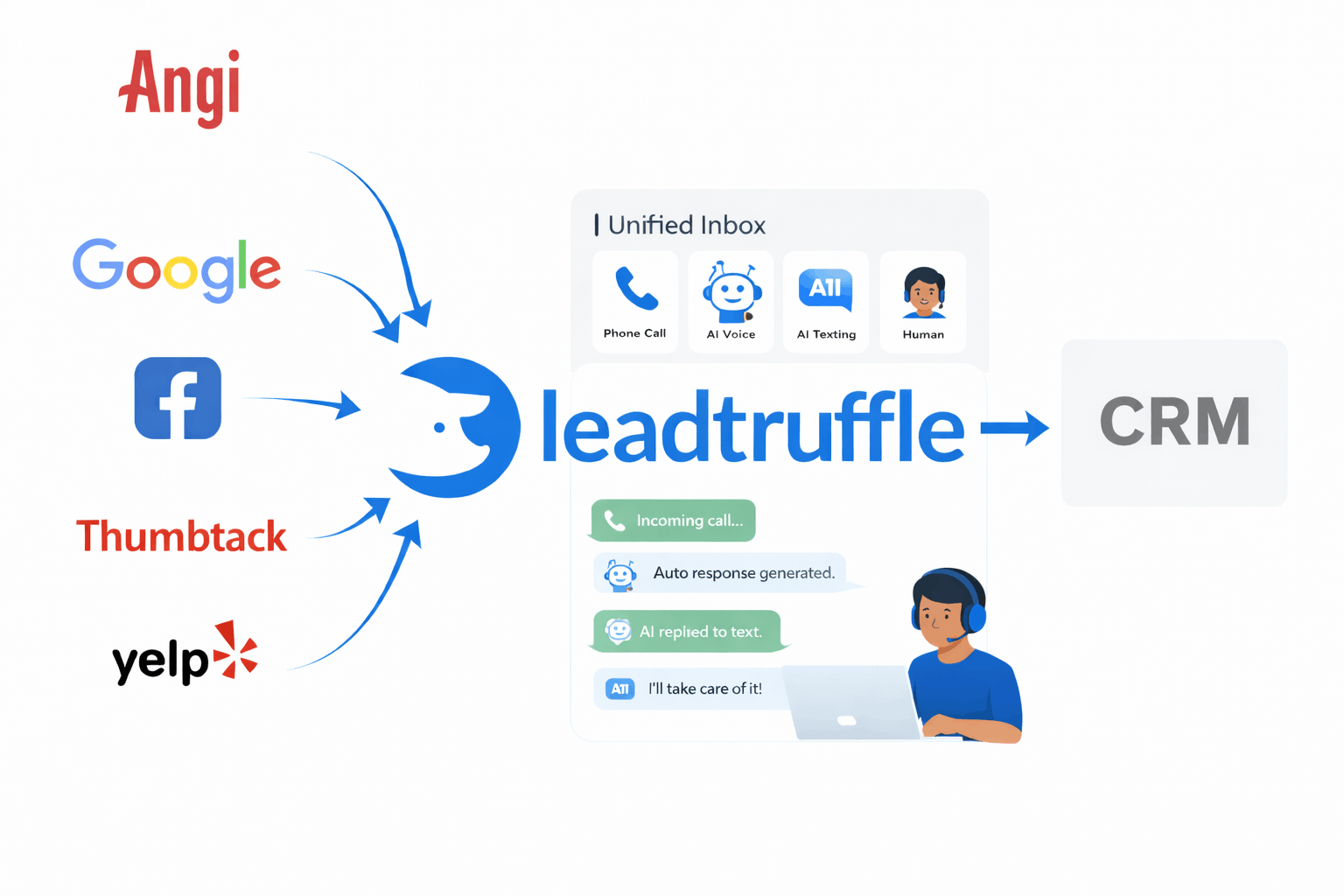
LeadTruffle now supports Angi as a first-class lead source via a simple webhook integration. Combined with our Angi autoresponder, every Angi lead flows directly into your unified inbox alongside website inquiries, missed calls, Yelp messages, and everything else - so you never have to context-switch again.
Why the Angi + LeadTruffle Integration Matters
- One inbox for everything – Angi leads appear in the same conversation view as your website widget submissions, missed call text-backs, and other lead sources. No more juggling multiple dashboards.
- AI qualification over email or SMS – Unlike platforms where you reply inside their messaging system, Angi leads get qualified through your choice of email or SMS follow-up. LeadTruffle’s AI handles the conversation automatically.
- Zero-code webhook setup – No Zapier required. Just copy your unique webhook URL from LeadTruffle and paste it into Angi. Done.
- Rich Angi metadata preserved – Task type, interview answers, and Angi lead IDs all flow into LeadTruffle so your team has full context when following up.
- Works with your existing CRM – Route qualified Angi leads to Jobber, Housecall Pro, HubSpot, or any other system via our native integrations or Zapier.
How the Angi → LeadTruffle Webhook Works
- Generate your webhook URL: Inside LeadTruffle, navigate to
/external-integrationsand open the Angi panel. We generate a unique webhook URL for your company. - Register with Angi: Paste that URL into your Angi business account’s webhook settings. Angi will start pushing lead data to LeadTruffle in real time.
- Choose your qualification mode: Decide how LeadTruffle should follow up - ingest only, email qualification, or SMS qualification.
- AI takes over: When a lead arrives, LeadTruffle’s AI reaches out via your chosen channel, asks your qualifying questions, and captures the responses.
- Review in your unified inbox: Every Angi conversation appears in
/conversationswith an Angi badge, full transcript, and extracted lead details.
✅ No engineering required: The entire setup takes about 5 minutes. If you can copy and paste a URL, you can connect Angi to LeadTruffle.
Three Ways to Process Angi Leads
LeadTruffle gives you flexibility in how Angi leads get handled:
1. Ingest Only
Store the lead and send yourself a notification. Great if you want to call every Angi lead manually but still want them organized in your unified inbox alongside other sources.
2. Email Qualification
LeadTruffle sends an AI-powered email conversation to qualify the lead. This requires setting up an Angi-mode email gateway at /email-gateway. The AI asks your qualifying questions, captures responses, and updates the lead record automatically.
3. SMS Qualification
LeadTruffle texts the lead to qualify them - the same AI experience as our website widget or missed call text-back. This requires a 10DLC phone number and explicit Angi SMS consent (we help you stay compliant).
Data That Flows from Angi into LeadTruffle
Every Angi lead arrives with rich context your team can act on immediately:
Lead Profile
- Full name and contact info
- Phone number and email
- Service address or area
Project Details
- Task type (e.g., “HVAC Repair”, “Roof Replacement”)
- Interview answers from Angi’s lead form
- Timeline, budget, and special requests
Angi Metadata
- Angi lead ID for reference
- Source attribution for reporting
- AI qualification score and transcript
Step-by-Step: Connecting Angi to LeadTruffle
1. Open the External Integrations Page
Navigate to app.leadtruffle.com/external-integrations and find the Angi panel.
2. Copy Your Webhook URL
LeadTruffle generates a unique webhook URL for your company. Click to copy it.
3. Register the Webhook in Angi
Log into your Angi business account, find the webhook or API settings, and paste your LeadTruffle URL. Save the configuration.
4. Choose Your Processing Mode
Back in LeadTruffle, select how you want leads processed:
- Ingest only – Just store and notify
- Email qualification – AI follows up via email (requires email gateway setup)
- SMS qualification – AI follows up via text (requires 10DLC number)
5. Configure Your AI Agent
If using email or SMS qualification, customize the AI prompt at the corresponding settings page. Define the questions you want answered: service type, address, timeline, budget, etc.
6. Test with a Real Lead
Have a friend submit a test inquiry through Angi, or wait for your next real lead. Watch it appear in LeadTruffle within seconds.
The Unified Inbox Experience
Here’s where LeadTruffle really shines. Instead of checking Angi separately, your Angi leads show up in the same /conversations view as everything else:
- Angi badge – Instantly identify the lead source
- Full conversation thread – See every AI message and lead response
- Manual takeover – Jump in and reply personally whenever you want
- Lead details panel – View extracted info, Angi metadata, and qualification score
- One-click CRM sync – Push to Jobber, HubSpot, or your preferred system
Your team works from one screen. No more “did anyone check Angi today?”
Best Practices for Angi Lead Qualification
- Respond fast: Angi leads are often shopping multiple providers. AI qualification means you’re engaging within seconds, not hours.
- Keep questions short: Whether email or SMS, respect the lead’s time. 3-5 qualifying questions max.
- Use the task type: Angi provides the service category - reference it in your AI greeting so the lead knows you understand what they need.
- Set up notifications: Get an email or Slack ping when high-intent Angi leads come through so your team can follow up personally.
- Track attribution: Tag all Angi leads with
source: "angi"for clean reporting across channels.
Real-World Use Cases
- HVAC company: Angi sends a lead for “AC not cooling.” LeadTruffle’s AI texts the homeowner, confirms the address, asks about the unit age, and routes the qualified lead to the dispatcher - all before the competitor even saw the notification.
- Roofing contractor: Email qualification captures storm damage details and photos. The estimator gets a complete brief before making the first call.
- Multi-location franchise: Route Denver Angi leads to Team A, Phoenix to Team B, each with their own AI prompts and CRM destinations.
- Plumber on the job: Can’t check Angi while elbow-deep in a water heater. LeadTruffle’s AI handles the conversation and sends a summary notification when the lead is qualified.
Frequently Asked Questions
Do I need Zapier for this integration?
No. The Angi integration is a direct webhook - no Zapier required. Just copy your URL from LeadTruffle and paste it into Angi.
Can I reply inside Angi like I do with Yelp?
No, the Angi integration works differently. Angi pushes lead data via webhook, and LeadTruffle follows up via email or SMS. The conversation happens outside the Angi platform.
What if I just want to be notified without AI follow-up?
Select “Ingest only” mode. LeadTruffle will store the lead, tag it as Angi, and send you a notification - but won’t send any automated messages.
Is SMS qualification compliant?
Yes, but you need a 10DLC phone number and must ensure Angi SMS consent is properly collected. LeadTruffle helps you stay compliant with proper opt-in language.
Will my existing Angi leads import?
The webhook captures new leads going forward. Historical leads would need to be imported separately - contact support if you need help with that.
Ready to Connect Angi?
- Head to app.leadtruffle.com/external-integrations and open the Angi panel.
- Copy your unique webhook URL.
- Paste it into your Angi business account’s webhook settings.
- Choose your qualification mode and customize your AI agent.
Every Angi lead now flows into your unified inbox automatically. No more missed notifications, no more context-switching, no more losing jobs to faster competitors.
Questions about setup or compliance? Email [email protected] and we’ll help you get connected.